Cloud
Hi localhost community!
Cloud
Hi localhost community!
kjay747-400"
If the link you are trying to send is just some kind of harmless confirmation link (e.g. subscribe/unsubscribe from a newsletter), then at least use a form inside the web page to do the actual confirmation through a POST request (possibly also using a CSRF token), otherwise you will unequivocally end up with false positives.
Drupal use a HTTP GET to change data witch is not how HTTP protocol is supposed to be work. A HTTP POST request should be used to change an account from blocked to active. It's a bug and a ugly one.
If you want to be (relatively) sure that any action is triggered only by a (specific) human user, then use URLs in emails or other kind of messages over the internet only to lead them to a website where they confirm an action to be taken via a form, using method=POST
Links (GETs) aren't supposed to "do" anything, only a POST is. For example, your "unsubscribe me" link in your email should not directly unsubscribe th subscriber. It should "GET" a page the subscriber can then post from.
The purpose of distinguishing between safe and unsafe methods is to allow automated retrieval processes (spiders) and cache performance optimization (pre-fetching) to work without fear of causing harm.
Request methods are considered "safe" if their defined semantics are essentially read-only; i.e., the client does not request, and does not expect, any state change on the origin server as a result of applying a safe method to a target resource.
Salmon, G. (2019) E-tivities. Disponível em: https://www.gillysalmon.com/
O link, no meu caso , não abriu. Só abre em http://www.gillysalmon.com/ (http sem segurança).
http://example.com/didcomm
No need for transport security, given the payload is E2EE.
PADC
Paris Astronomical Data Center
By default, curl uses HTTP/1.1 for the http scheme and HTTP/2 for https. You can change this with flags
Water immobilization is a cool thing! The simplest way to accomplish it is by freezing. But can you think of how water might be immobilized (so to speak) at temperatures above freezing, say at 50°F (10°C)? Think Jell-O and a new process that mimics caviar and you have two methods that nearly stop water in its tracks.
I learned that science and cooking is always connected. Even if we don't think about it in every day life like when water evaporates or freezes it is chemistry. But what I found most interesting that I learned is how water immobilization works, or to put it more simply the science behind Jell-O. When you add gelatin to water it traps the water molecules in place which creates the sort of liquid and solid hybrid we find with Jell-O.
console
curl -G https://wdqs-beta.wmflabs.org/bigdata/namespace/wdq/sparql --data-urlencode query='
select distinct ?type where {
?thing a ?type
}
limit
You can mark topics provided by request headers as observed by setting an Observe-Browsing-Topics: ?1 header on the response to the request. The browser will then use those topics to calculate topics of interest for a user.
```js // CSRF
/* @type {import('@sveltejs/kit').Config} / const config = { kit: { checkOrigin?: true, } }; export default config; ```
```js // CSP svelte.config.js
/* @type {import('@sveltejs/kit').Config} / const config = { kit: { csp: { directives: { 'script-src': ['self'] }, reportOnly: { 'script-src': ['self'] } } } };
export default config; ```
html
<meta http-equiv="Accept-CH" content="DPR, Viewport-Width, Width">
...
<picture>
    <!-- serve WebP to Chrome and Opera -->
    <source
    media="(min-width: 50em)"
    sizes="50vw"
    srcset="/image/thing-200.webp 200w, /image/thing-400.webp 400w,
        /image/thing-800.webp 800w, /image/thing-1200.webp 1200w,
        /image/thing-1600.webp 1600w, /image/thing-2000.webp 2000w"
    type="image/webp">
    <source
    sizes="(min-width: 30em) 100vw"
    srcset="/image/thing-crop-200.webp 200w, /image/thing-crop-400.webp 400w,
        /image/thing-crop-800.webp 800w, /image/thing-crop-1200.webp 1200w,
        /image/thing-crop-1600.webp 1600w, /image/thing-crop-2000.webp 2000w"
    type="image/webp">
    <!-- serve JPEGXR to Edge -->
    <source
    media="(min-width: 50em)"
    sizes="50vw"
    srcset="/image/thing-200.jpgxr 200w, /image/thing-400.jpgxr 400w,
        /image/thing-800.jpgxr 800w, /image/thing-1200.jpgxr 1200w,
        /image/thing-1600.jpgxr 1600w, /image/thing-2000.jpgxr 2000w"
    type="image/vnd.ms-photo">
    <source
    sizes="(min-width: 30em) 100vw"
    srcset="/image/thing-crop-200.jpgxr 200w, /image/thing-crop-400.jpgxr 400w,
        /image/thing-crop-800.jpgxr 800w, /image/thing-crop-1200.jpgxr 1200w,
        /image/thing-crop-1600.jpgxr 1600w, /image/thing-crop-2000.jpgxr 2000w"
    type="image/vnd.ms-photo">
    <!-- serve JPEG to others -->
    <source
    media="(min-width: 50em)"
    sizes="50vw"
    srcset="/image/thing-200.jpg 200w, /image/thing-400.jpg 400w,
        /image/thing-800.jpg 800w, /image/thing-1200.jpg 1200w,
        /image/thing-1600.jpg 1600w, /image/thing-2000.jpg 2000w">
    <source
    sizes="(min-width: 30em) 100vw"
    srcset="/image/thing-crop-200.jpg 200w, /image/thing-crop-400.jpg 400w,
        /image/thing-crop-800.jpg 800w, /image/thing-crop-1200.jpg 1200w,
        /image/thing-crop-1600.jpg 1600w, /image/thing-crop-2000.jpg 2000w">
    <!-- fallback for browsers that don't support picture -->
    <img src="/image/thing.jpg" width="50%">
</picture>
```js // Log the full user-agent data navigator .userAgentData.getHighEntropyValues( ["architecture", "model", "bitness", "platformVersion", "fullVersionList"]) .then(ua => { console.log(ua) });
// output { "architecture":"x86", "bitness":"64", "brands":[ { "brand":" Not A;Brand", "version":"99" }, { "brand":"Chromium", "version":"98" }, { "brand":"Google Chrome", "version":"98" } ], "fullVersionList":[ { "brand":" Not A;Brand", "version":"99.0.0.0" }, { "brand":"Chromium", "version":"98.0.4738.0" }, { "brand":"Google Chrome", "version":"98.0.4738.0" } ], "mobile":false, "model":"", "platformVersion":"12.0.1" } ```
http-equiv attribute.html
<meta http-equiv="Accept-CH" content="Width, Downlink, Sec-CH-UA" />
http
  HTTP/1.1 200 OK
  Content-Type: text/html
  Accept-CH: Sec-CH-Prefers-Reduced-Motion
  Vary: Sec-CH-Prefers-Reduced-Motion
  Critical-CH: Sec-CH-Prefers-Reduced-Motion
http
Sec-CH-UA-Mobile: ?1
```idl dictionary NavigatorUABrandVersion { DOMString brand; DOMString version; };
dictionary UADataValues { DOMString architecture; DOMString bitness; sequence<NavigatorUABrandVersion> brands; DOMString formFactor; sequence<NavigatorUABrandVersion> fullVersionList; DOMString model; boolean mobile; DOMString platform; DOMString platformVersion; DOMString uaFullVersion; // deprecated in favor of fullVersionList boolean wow64; };
dictionary UALowEntropyJSON { sequence<NavigatorUABrandVersion> brands; boolean mobile; DOMString platform; };
[Exposed=(Window,Worker)] interface NavigatorUAData { readonly attribute FrozenArray<NavigatorUABrandVersion> brands; readonly attribute boolean mobile; readonly attribute DOMString platform; Promise<UADataValues> getHighEntropyValues (sequence<DOMString> hints ); UALowEntropyJSON toJSON (); };
interface mixin NavigatorUA { [SecureContext] readonly attribute NavigatorUAData userAgentData ; };
Navigator includes NavigatorUA; WorkerNavigator includes NavigatorUA; ```
``` wrangler dev --test-scheduled
$ curl "http://localhost:8787/__scheduled?cron=++++*" ```
js
export default {
  async scheduled(event, env, ctx) {
    ctx.waitUntil(doSomeTaskOnASchedule());
  },
};
```js async function main() { const blob = new Blob([new Uint8Array(10 * 1024 * 1024)]); // any Blob, including a File const uploadProgress = document.getElementById("upload-progress"); const downloadProgress = document.getElementById("download-progress");
const totalBytes = blob.size; let bytesUploaded = 0;
// Use a custom TransformStream to track upload progress const progressTrackingStream = new TransformStream({ transform(chunk, controller) { controller.enqueue(chunk); bytesUploaded += chunk.byteLength; console.log("upload progress:", bytesUploaded / totalBytes); uploadProgress.value = bytesUploaded / totalBytes; }, flush(controller) { console.log("completed stream"); }, }); const response = await fetch("https://httpbin.org/put", { method: "PUT", headers: { "Content-Type": "application/octet-stream" }, body: blob.stream().pipeThrough(progressTrackingStream), duplex: "half", });
// After the initial response headers have been received, display download progress for the response body let success = true; const totalDownloadBytes = response.headers.get("content-length"); let bytesDownloaded = 0; const reader = response.body.getReader(); while (true) { try { const { value, done } = await reader.read(); if (done) { break; } bytesDownloaded += value.length; if (totalDownloadBytes != undefined) { console.log("download progress:", bytesDownloaded / totalDownloadBytes); downloadProgress.value = bytesDownloaded / totalDownloadBytes; } else { console.log("download progress:", bytesDownloaded, ", unknown total"); } } catch (error) { console.error("error:", error); success = false; break; } }
console.log("success:", success); } main().catch(console.error); ```
On any Web page run the following code
js
await startLocalServer();
let abortable = new AbortController;
let {signal} = abortable;
(await fetch('https://localhost:8443', {
  method: 'post',
  body: 'cat local_server_export.js', // Code executed in server, piped to browser
  duplex: 'half',
  headers: {
    'Access-Control-Request-Private-Network': true
  },
  signal
})).body.pipeThrough(new TextDecoderStream()).pipeTo(new WritableStream({
  write(v) {
    console.log(v);
  },
  close() {
    console.log('close');
  },
  abort(reason) {
    console.log(reason);
  }
})).catch(console.warn);
await resetLocalServer();
abnf
Retry-After: <http-date>
Retry-After: <delay-seconds>
http
Retry-After: Wed, 21 Oct 2015 07:28:00 GMT
Retry-After: 120
A Retry-After header might be included to this response indicating how long to wait before making a new request.
http
HTTP/1.1 429 Too Many Requests
Content-Type: text/html
Retry-After: 3600
Bi-directional links were initially supported within HTTP viaLINK and UNLINK methods; they were not widely adopted, andwere later removed
abnf
Accept-Ranges: <range-unit>
Accept-Ranges: none
abnf
Range: <unit>=<range-start>-
Range: <unit>=<range-start>-<range-end>
Range: <unit>=<range-start>-<range-end>, <range-start>-<range-end>
Range: <unit>=<range-start>-<range-end>, <range-start>-<range-end>, <range-start>-<range-end>
Range: <unit>=-<suffix-length>
```http GET http://localhost:50714/api/Car HTTP/1.1 User-Agent: Fiddler Host: localhost:50714 Range: x-entity=2-5
HTTP/1.1 206 Partial Content Cache-Control: no-cache Pragma: no-cache Content-Type: application/json; charset=utf-8 Content-Range: x-entity 2-5/10 Expires: -1 Server: Microsoft-IIS/8.0 Date: Tue, 31 Jul 2012 19:00:19 GMT Content-Length: 447
[{"Id":3,"Make":"Toyota","Model":"Yaris","BuildYear":2003,"Price":3750.0,... ```
```http GET /users
200 OK Accept-Ranges: users Content-Range: users 0-9/200
[ 0, …, 9 ] ```
```http GET /users Range: users=0-9
206 Partial Content Accept-Ranges: users Content-Range: users 0-9/200
[ 0, …, 9 ] ```
```http GET /users Range: users=0-9,50-59
206 Partial Content Accept-Ranges: users Content-Type: multipart/mixed; boundary=next
--next Content-Range: users 0-9/200
[ 0, …, 9 ]
--next Content-Range: users 50-59/200
[ 50, …, 59 ]
--next-- ```
```http GET /users?name=Fred
206 Partial Content Accept-Ranges: users Content-Range: users 0-100/*
[ 0, …, 100 ] ```
Figured it out. Cache-Control header is required.
js
const headers = { 'Cache-Control': 'public, max-age=604800' };
const request = new Request('https://foobar.com/')
const cacheResponse = new Response('bar',{ headers })
const cache = caches.default
await cache.put(request, cacheResponse)
const response = await cache.match(request);
npx check-my-headers https://example.com
```bash
GET /sparql/ HTTP/1.1 Host: www.example
HTTP/1.1 200 OK Date: Fri, 09 Oct 2009 17:31:12 GMT Server: Apache/1.3.29 (Unix) PHP/4.3.4 DAV/1.0.3 Connection: close Content-Type: application/rdf+xml
<rdf:RDF xmlns:rdf="http://www.w3.org/1999/02/22-rdf-syntax-ns#" xmlns:sd="http://www.w3.org/ns/sparql-service-description#" xmlns:prof="http://www.w3.org/ns/owl-profile/" xmlns:void="http://rdfs.org/ns/void#"> <sd:Service> <sd:endpoint rdf:resource="http://www.example/sparql/"/> <sd:supportedLanguage rdf:resource="http://www.w3.org/ns/sparql-service-description#SPARQL11Query"/> <sd:resultFormat rdf:resource="http://www.w3.org/ns/formats/RDF_XML"/> <sd:resultFormat rdf:resource="http://www.w3.org/ns/formats/Turtle"/> <sd:feature rdf:resource="http://www.w3.org/ns/sparql-service-description#DereferencesURIs"/> <sd:defaultEntailmentRegime rdf:resource="http://www.w3.org/ns/entailment/RDFS"/> <sd:extensionFunction> <sd:Function rdf:about="http://example.org/Distance"/> </sd:extensionFunction> <sd:defaultDataset> <sd:Dataset> <sd:defaultGraph> <sd:Graph> <void:triples rdf:datatype="http://www.w3.org/2001/XMLSchema#integer">100</void:triples> </sd:Graph> </sd:defaultGraph> <sd:namedGraph> <sd:NamedGraph> <sd:name rdf:resource="http://www.example/named-graph"/> <sd:entailmentRegime rdf:resource="http://www.w3.org/ns/entailment/OWL-RDF-Based"/> <sd:supportedEntailmentProfile rdf:resource="http://www.w3.org/ns/owl-profile/RL"/> <sd:graph> <sd:Graph> <void:triples rdf:datatype="http://www.w3.org/2001/XMLSchema#integer">2000</void:triples> </sd:Graph> </sd:graph> </sd:NamedGraph> </sd:namedGraph> </sd:Dataset> </sd:defaultDataset> </sd:Service> </rdf:RDF> ```
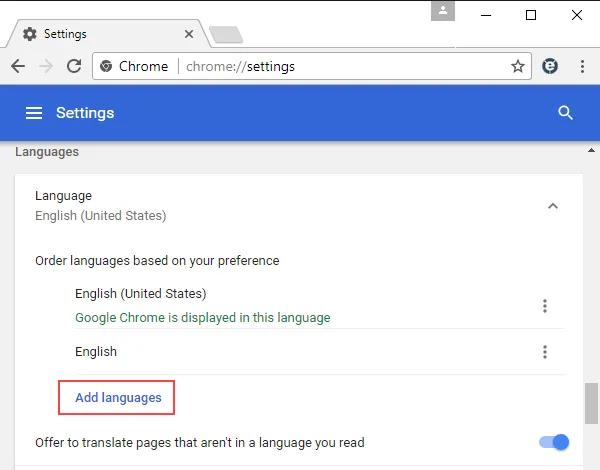
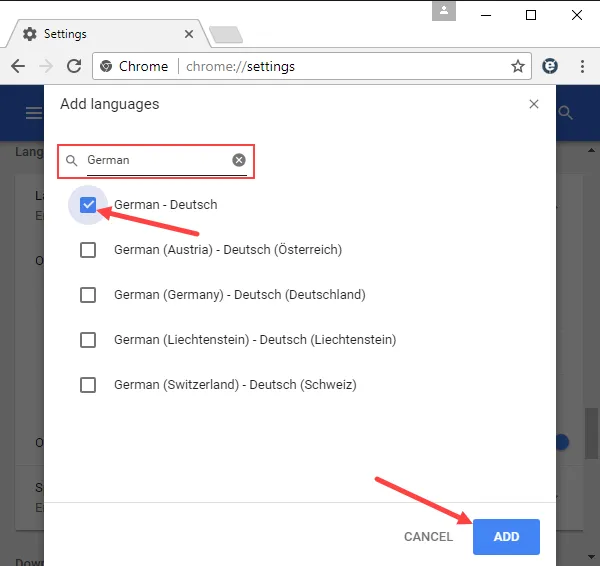
Add more languages to be sent in the HTTP Accept-Language header field:
http
Accept-Language: en-US,en;q=0.9,fr;q=0.8`
The 409 (Conflict) or 415 (Unsupported Media Type) status codes are suggested
If the target resource does not have a current representation and the PUT successfully creates one, then the origin server MUST inform the user agent by sending a 201 (Created) response. If the target resource does have a current representation and that representation is successfully modified in accordance with the state of the enclosed representation, then the origin server MUST send either a 200 (OK) or a 204 (No Content) response to indicate successful completion of the request.
HTTP 400 is the right status code for your case from REST perspective as its syntactically incorrect to send sales_tax instead of tax, though its a valid JSON.
Ideal Scenario for 422: In an ideal world, 422 is preferred and generally acceptable to send as response if the server understands the content type of the request entity and the syntax of the request entity is correct but was unable to process the data because its semantically erroneous.
As I said above, the deciding factor is what is meant by syntax. If the request was sent with a Content Type of application/json, then yes, the request is syntactically valid because it's valid JSON syntax, but not semantically valid, since it doesn't match what's expected. (assuming a strict definition of what makes the request in question semantically valid or not). If, on the other hand, the request was sent with a more specific custom Content Type like application/vnd.mycorp.mydatatype+json that, perhaps, specifies exactly what fields are expected, then I would say that the request could easily be syntactically invalid, hence the 400 response.
Missing field can be a field that has not been sent and that's clearly a 400 to me, because the app cannot understand this payload, it violates the contract. IMHO, 400 suits better to not well-formed JSON, JSON that has different key names (contract violation) and JSON that one or more of the field(s) contents is from another type, let's say, you expect a int and got an object. Even not null constraint can be in both status codes, 400 if field not sent at all (and most frameworks understands it as null), and 422 if sent but with null value.
Your answer (422) makes sense to me. This is also what Rails (respond_with) uses when a resource couldn't be processed because of validation errors.
Michael Kropat put together a set of decision charts that helps determine the best status code for each situation. See the following for 4xx status codes:
HTTP is an extensible protocol and 422 is registered in IANA, which makes it a standard status code. So nothing stops you from using 422 in your application. And since June 2022, 422 is defined in the RFC 9110, which is the document that currently defines the semantics of the HTTP protocol:
15.5.21. 422 Unprocessable Content The 422 (Unprocessable Content) status code indicates that the server understands the content type of the request content (hence a 415 (Unsupported Media Type) status code is inappropriate), and the syntax of the request content is correct, but it was unable to process the contained instructions. For example, this status code can be sent if an XML request content contains well-formed (i.e., syntactically correct), but semantically erroneous XML instructions.
Put that TS code in a file your app imports, for example, in remix.env.d.ts, and now the type of name will be the expected one.
ts
declare module "@remix-run/server-runtime" {
  export interface AppLoadContext {
    name: string;
  }
}
none/unknown.fetch). In this case, the subrequest will be logged with a cache status, while the main request will be logged with none/unknown status (the main request did not hit cache, since Workers sits in front of cache).none/unknown.none/unknown.no-cache,private, or max-age=0 even though
Cloudflare originally preferred to cache the asset. BYPASS is returned when enabling Origin Cache-Control. Cloudflare also sets BYPASS when
your origin web server sends cookies in the response header.</td></tr><tr><td colspan="5" rowspan="1">REVALIDATED</td><td colspan="5" rowspan="1">The resource is served from Cloudflare’s cache but is stale. The resource was revalidated by
either an If-Modified-Since header or an If-None-Match header.</td></tr><tr><td colspan="5" rowspan="1">UPDATING</td><td colspan="5" rowspan="1">The resource was served from Cloudflare’s cache and was expired, but the origin web server
is updating the resource. UPDATING is typically only seen for very popular cached resources.</td></tr><tr><td colspan="5" rowspan="1">DYNAMIC</td><td colspan="5" rowspan="1">Cloudflare does not consider the asset eligible to cache and your Cloudflare settings do not
explicitly instruct Cloudflare to cache the asset. Instead, the asset was requested from the
origin web server. Use Page Rules to implement
custom caching options.</td></tr></tbody></table>
On the client, while we're waiting for our deferred promise to resolve, we can consume that stream to know how far along our process is.
js
const stream = useEventSource(
  `/items/${params.hash}/progress`,
  {
    event: "progress",
  },
)
In Remix, we can use a resource route to make this endpoint, and our loader will return a stream that constant checks our JSON file for its progress.
js
export async function loader({
  request,
  params,
}: LoaderArgs) {
  const hash = params.hash
  return eventStream(request.signal, function setup(send) {
    const interval = setInterval(() => {
      const file = fs.readFileSync(
        path.join("public", "items", `${hash}.json`),
      )
      if (file.toString()) {
        const data = JSON.parse(file.toString())
        const progress = data.progress
        send({ event: "progress", data: String(progress) })
        if (progress === 100) {
          clearInterval(interval)
        }
      }
    }, 200)
    return function clear(timer: number) {
      clearInterval(interval)
      clearInterval(timer)
    }
  })
}
server sent events work by having an endpoint that does not immediately close its connection, and which sends a content type of text/event-stream.
Use Follow TCP Stream to display HTTP response chunks
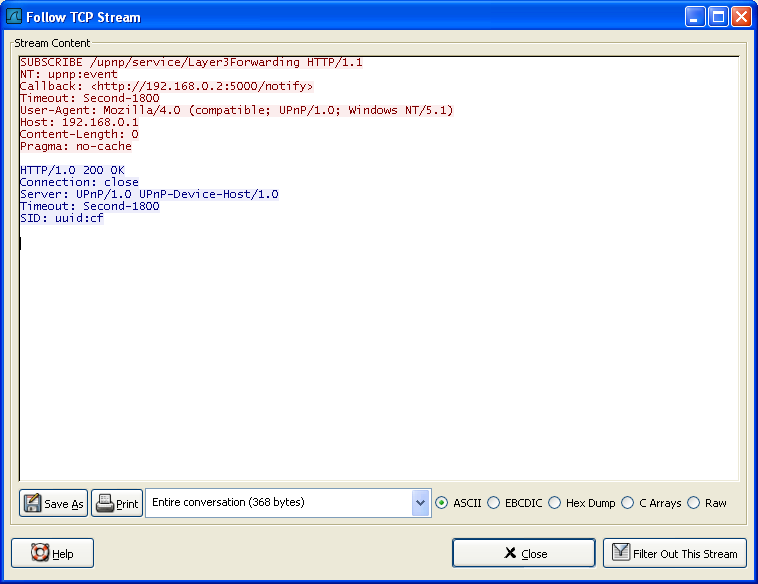
Chunked encoding is useful when larger amounts of data are sent to the client and the total size of the response may not be known until the request has been fully processed. For example, when generating a large HTML table resulting from a database query or when transmitting large images.A chunked response looks like this:
```http HTTP/1.1 200 OK Content-Type: text/plain Transfer-Encoding: chunked
7\r\n Mozilla\r\n 11\r\n Developer Network\r\n 0\r\n \r\n ```
chunked Data is sent in a series of chunks. The Content-Length header is omitted in this case and at the beginning of each chunk you need to add the length of the current chunk in hexadecimal format, followed by '\r\n' and then the chunk itself, followed by another '\r\n'. The terminating chunk is a regular chunk, with the exception that its length is zero. It is followed by the trailer, which consists of a (possibly empty) sequence of header fields.
```abnf Transfer-Encoding: chunked Transfer-Encoding: compress Transfer-Encoding: deflate Transfer-Encoding: gzip
// Several values can be listed, separated by a comma Transfer-Encoding: gzip, chunked ```
I beseech ye, my lord, let this venture be mine.
When the Green Knight called the knights' loyalty into question, Gawain saw Arthur's humiliation and felt compelled to defend him. Sheri Ann Strite explains that "Gawain is free to choose his next act, and through his choice he reveals with which set of values he is aligned" (p. 5), Gawain saw this as a chance to prove his morality to Arthur. Gawain's bravery and loyalty to Arthur are demonstrated by his acceptance of the challenge when no one else would. Furthermore, his devotion to Arthur exemplifies the code of chivalry.
```js import { useState, useEffect } from 'react';
interface StreamState { data: Uint8Array | null; error: Error | null; controller: AbortController; }
const useAbortableStreamFetch = (url: string, options?: RequestInit): { data: Uint8Array | null, error: Error | null, abort: () => void, } => {
const [state, setState] = useState<StreamState>({ data: null, error: null, controller: new AbortController(), });
useEffect(() => { (async () => { try { const resp = await fetch(url, { ...options, signal: state.controller.signal, }); if (!resp.ok || !resp.body) { throw resp.statusText; }
    const reader = resp.body.getReader();
    while (true) {
      const { value, done } = await reader.read();
      if (done) {
        break;
      }

      setState(prevState => ({ ...prevState, ...{ data: value } }));
    }
  } catch (err) {
    if (err.name !== 'AbortError') {
      setState(prevState => ({ ...prevState, ...{ error: err } }));
    }
  }
})();

return () => state.controller.abort();
}, [url, options]);
return { data: state.data, error: state.error, abort: () => state.controller && state.controller.abort(), }; };
export default useAbortableStreamFetch; ```