```go package main import “fmt” func main() { fmt.Println(“Hello, world”) }
gaps between lines is off here.
```go package main import “fmt” func main() { fmt.Println(“Hello, world”) }
gaps between lines is off here.
```go
No close fence?
Need to eliminate the overlap between this page and the Development Setup page.
–
Should be U+2014
Be as specific or vague as you'd like – it is your blog
This should be an em dash (U+2014). Here, it is an en dash (U+2013).
one more
"one"?
-g
bad hygiene; unnecessary
install LESS compiler
This step prompts me for superuser privileges (it shouldn't; probably installing lessc as a global utility (it shouldn't)) and then still fails.
Need to eliminate the overlap between this page and the Getting Started page.
I'm maintaining one that can be run and asserted on: https://github.com/cirosantilli/rails-cheat/blob/master/app/test/integration/capybara_test.rb
The urgent argument for turning any company into a software company is the growing availability of data, both inside and outside the enterprise. Specifically, the implications of so-called “big data”—the aggregation and analysis of massive data sets, especially mobile
Every company is described by a set of data, financial and other operational metrics, next to message exchange and paper documents. What else we find that contributes to the simulacrum of an economic narrative will undeniably be constrained by the constitutive forces of its source data.
Third configurable block to run.
I like how they identify in the description which order things run in: 1st, 2nd, 3rd, and last.
Though, it would be more readable to have a list of them, in chronological order, rather than having them listed in alphabetical order.
Sprockets 4: The effect of config.assets.debug does not match the rails documentation.
This appears to be an undocumented breaking change. For example, the word "debug" does not appear in the sprockets 4 changelog.
Should it only contain link* calls?
The docs say: "When using Rails and Sprockets in development mode, no assets are concatenated."
demonstrate
I’ve continued to discover new features in Tweetbot for the first time, believe it or not.
.
Page Note Test Not quite sure why I haven't tried Page Notes yet but...
First sighting (type: mention/link): https://hyp.is/3AMkJHumEeurpAsw_sA3nA/trailblazer.to/2.1/blog.html
Example that uses it: https://github.com/trailblazer/tutorial/blob/master/ruby/test/basics_test.rb
we have a helpful little framework behind the page rendering that pulls code snippets from real tests out of the actual gems
Writing documentation for the new website has been fun. Yes, fun!
We have fully documented the migration path to 2.1 while upgrading several complex apps. It worked.
Advanced features like tracing, input/output filters or type checking leverage the framework argument flow_options
What this means is: I better refrain from writing a new book and we rather focus on more and better docs.
I'm glad. I didn't like that the book (which is essentially a form of documentation/tutorial) was proprietary.
I think it's better to make documentation and tutorials be community-driven free content
We try to keep the “information architecture” - a word I wouldn’t have learned without the inspiring Alex Coles - as simple as possible: so far, we got a handful of pages accessible through the top navigation, and then the documentation behind the DOCS link. Here, the right sidebar helps you to navigate within the chapter.
Use the desc option to provide human-readable descriptions of filters. You should prefer these to comments because they can be used to generate documentation.
NIX_PATHA colon-separated list of directories used to look up Nix expressions enclosed in angle brackets (i.e., <path>). For instance, the value
It would be helpful to
<path> will work with the prefixless format, but not with the prefixed one, and it may be helpful to spell this out explicitly.
0 [14:16:19] nix repl
Welcome to Nix version 2.3.10. Type :? for help.

nix-repl> :l <nixpkgs/doc>
Added 40 variables.

nix-repl> :l <doc>
error: file 'doc' was not found in the Nix search path (add it using $NIX_PATH or -I)
I always saw a NIXPATH used with the prefix syntax so far:
$ echo $NIX_PATH
nixpkgs=/nix/var/nix/profiles/per-user/root/channels/nixos:nixos-config=/etc/nixos/configuration.nix:/nix/var/nix/profiles/per-user/root
but NIX_PATH documentation shows that the prefixless format is also valid.
$ export NIX_PATH=/home/toraritte:/nix/var/nix/profiles/per-user/root/channels/nixos

$ printenv NIX_PATH
/home/toraritte:/nix/var/nix/profiles/per-user/root/channels/nixos

$ nix repl
Welcome to Nix version 2.3.10. Type :? for help.

nix-repl> :l <nixpkgs>
Added 12439 variables.
1-650-649-1942
estateclaims@my.usdirectexpress.com
1-650-649-1942
docs@my.usdirectexpress.com
every document could disappear 6 months after it's published unless whoever uploaded or created it says otherwise in an email the system sends them after six months, documents shouldn't live rent free
this is a great idea to ensure that documentation doesn't become stale.
Reload the systemd manager configuration. This will rerun all generators (see systemd.generator(7)), reload all unit files, and recreate the entire dependency tree. While the daemon is being reloaded, all sockets systemd listens on behalf of user configuration will stay accessible.
we do need to have this somewhere
I'm afraid there's only so much the docs & tutorials can do about something like this actually. When you first read them, you don't get Svelte well enough (since you're reading a tutorial...) for this to make sense to you. Then you try something, encounter a behaviour, question it, understand better... That's learning.
Anyway, If this is an expected behaviour, we should probably add an asterisk to the docs, describing the pitfall, because I believe many will be bitten by this.
These are good docs.
Referenced by: https://github.com/sveltejs/svelte/issues/3368#issuecomment-519289238
Would you mind adding it to the vendor README.md with a note to this commit so we remember?
More in-depth examples definitely sound like a good idea. I've seen cookbooks quite a few times already and they are always helpful.
They even named the main file react.js so when converting/migrating components from React you could (at least some of the time, perhaps) simply leave some of the imports as-is:
import {createHooks, useRef} from './react';
Only peer dependencies: Svelte and Final Form
In an effort to rethink how documentation works, we recently introduced Articles, longer-form prose that can sit side by side with shorter Q&A.
I don't read comments as I think they are dangerous
Why does he think they are dangerous?
I really have no idea how you came up with this solution but that reflects a major problem with many npm packages, i.e. 90 percent of the library documentation should be pulled from the Git issues or SO answers.
Austin S. (2020) This Lawyer Ran Errands for His High-Risk Wife. Then an Epidemiologist Rated His Every Move.https://elemental.medium.com/this-lawyer-ran-errands-for-his-high-risk-wife-then-an-epidemiologist-rated-his-every-move-f9a926ad96ec
To add documentation on a Svelte component that will show up as a docstring in LSP-compatible editors, you can use an HTML comment with the @component tag:
All of the components should allow passing MUI configuration properties to them so that they can be easily customized. In the case of RFF and MUI components with deeply nested structures of multiple subcomponents, you can pass the properties in with sepecial top level properties. This is very hard to document fully without making a mess, so please refer to the source code and demos for examples.
If we find that GitLab doesn't work as people expect, the documentation should be updated so this is no longer a surprise. This applies whether we classify it as a feature request or a bug.
Sometimes, the best way to learn is to mimic others. Here are some great examples of projects that use documentation well:
Examples of projects that use documentation well
(chech the list below)
“Code is more often read than written.” — Guido van Rossum
Documenting code is describing its use and functionality to your users. While it may be helpful in the development process, the main intended audience is the users.
Documenting code:
Class method docstrings should contain the following: A brief description of what the method is and what it’s used for Any arguments (both required and optional) that are passed including keyword arguments Label any arguments that are considered optional or have a default value Any side effects that occur when executing the method Any exceptions that are raised Any restrictions on when the method can be called
Class method should contain:
(check example below)
Comments to your code should be kept brief and focused. Avoid using long comments when possible. Additionally, you should use the following four essential rules as suggested by Jeff Atwood:
Comments should be as concise as possible. Moreover, you should follow 4 rules of Jeff Atwood:
From examining the type hinting, you can immediately tell that the function expects the input name to be of a type str, or string. You can also tell that the expected output of the function will be of a type str, or string, as well.
Type hinting introduced in Python 3.5 extends 4 rules of Jeff Atwood and comments the code itself, such as this example:
def hello_name(name: str) -> str:
    return(f"Hello {name}")
strDocstrings can be further broken up into three major categories: Class Docstrings: Class and class methods Package and Module Docstrings: Package, modules, and functions Script Docstrings: Script and functions
3 main categories of docstrings
According to PEP 8, comments should have a maximum length of 72 characters.
If comment_size > 72 characters:
use `multiple line comment`
Docstring conventions are described within PEP 257. Their purpose is to provide your users with a brief overview of the object.
Docstring conventions
All multi-lined docstrings have the following parts: A one-line summary line A blank line proceeding the summary Any further elaboration for the docstring Another blank line
Multi-line docstring example:
"""This is the summary line

This is the further elaboration of the docstring. Within this section,
you can elaborate further on details as appropriate for the situation.
Notice that the summary and the elaboration is separated by a blank new
line.

# Notice the blank line above. Code should continue on this line.
say_hello.__doc__ = "A simple function that says hello... Richie style"
Example of using __doc:
Code (version 1):
def say_hello(name):
    print(f"Hello {name}, is it me you're looking for?")

say_hello.__doc__ = "A simple function that says hello... Richie style"
Code (alternative version):
def say_hello(name):
    """A simple function that says hello... Richie style"""
    print(f"Hello {name}, is it me you're looking for?")
Input:
>>> help(say_hello)
Returns:
Help on function say_hello in module __main__:

say_hello(name)
    A simple function that says hello... Richie style
class constructor parameters should be documented within the __init__ class method docstring
init
Scripts are considered to be single file executables run from the console. Docstrings for scripts are placed at the top of the file and should be documented well enough for users to be able to have a sufficient understanding of how to use the script.
Docstrings in scripts
Documenting your code, especially large projects, can be daunting. Thankfully there are some tools out and references to get you started
You can always facilitate documentation with tools.
(check the table below)
Commenting your code serves multiple purposes
Multiple purposes of commenting:
BUG, FIXME, TODOIn general, commenting is describing your code to/for developers. The intended main audience is the maintainers and developers of the Python code. In conjunction with well-written code, comments help to guide the reader to better understand your code and its purpose and design
Commenting code:
Along with these tools, there are some additional tutorials, videos, and articles that can be useful when you are documenting your project
Recommended videos to start documenting
(check the list below)
If you use argparse, then you can omit parameter-specific documentation, assuming it’s correctly been documented within the help parameter of the argparser.parser.add_argument function. It is recommended to use the __doc__ for the description parameter within argparse.ArgumentParser’s constructor.
argparse
There are specific docstrings formats that can be used to help docstring parsers and users have a familiar and known format.
Different docstring formats:
Daniele Procida gave a wonderful PyCon 2017 talk and subsequent blog post about documenting Python projects. He mentions that all projects should have the following four major sections to help you focus your work:
Public and Open Source Python projects should have the docs folder, and inside of it:
(check the table below for a summary)
Since everything in Python is an object, you can examine the directory of the object using the dir() command
dir() function examines directory of Python objects. For example dir(str).
Inside dir(str) you can find interesting property __doc__
Documenting your Python code is all centered on docstrings. These are built-in strings that, when configured correctly, can help your users and yourself with your project’s documentation.
Docstrings - built-in strings that help with documentation
Along with docstrings, Python also has the built-in function help() that prints out the objects docstring to the console.
help() function.
After typing help(str) it will return all the info about str object
The general layout of the project and its documentation should be as follows:
project_root/
│
├── project/  # Project source code
├── docs/
├── README
├── HOW_TO_CONTRIBUTE
├── CODE_OF_CONDUCT
├── examples.py
(private, shared or open sourced)
In all cases, the docstrings should use the triple-double quote (""") string format.
Think only about """ when using docstrings
mkdocs for diagrams seems cool. :)
https://github.com/UnlockedEdu/documentation-pipeline-generator
Installation in Windows Compatibility: > OpenCV 2.0 Author: Bernát Gábor You will learn how to setup OpenCV in your Windows Operating System!
OpenCV (Open Source Computer Vision Library) is an open source computer vision and machine learning software library. OpenCV was built to provide a common infrastructure for computer vision applications and to accelerate the use of machine perception in the commercial products. Being a BSD-licensed product, OpenCV makes it easy for businesses to utilize and modify the code. The library has more than 2500 optimized algorithms, which includes a comprehensive set of both classic and state-of-the-art computer vision and machine learning algorithms. These algorithms can be used to detect and recognize faces, identify objects, classify human actions in videos, track camera movements, track moving objects, extract 3D models of objects, produce 3D point clouds from stereo cameras, stitch images together to produce a high resolution image of an entire scene, find similar images from an image database, remove red eyes from images taken using flash, follow eye movements, recognize scenery and establish markers to overlay it with augmented reality, etc. OpenCV has more than 47 thousand people of user community and estimated number of downloads exceeding 18 million. The library is used extensively in companies, research groups and by governmental bodies. Along with well-established companies like Google, Yahoo, Microsoft, Intel, IBM, Sony, Honda, Toyota that employ the library, there are many startups such as Applied Minds, VideoSurf, and Zeitera, that make extensive use of OpenCV. OpenCV’s deployed uses span the range from stitching streetview images together, detecting intrusions in surveillance video in Israel, monitoring mine equipment in China, helping robots navigate and pick up objects at Willow Garage, detection of swimming pool drowning accidents in Europe, running interactive art in Spain and New York, checking runways for debris in Turkey, inspecting labels on products in factories around the world on to rapid face detection in Japan. It has C++, Python, Java and MATLAB interfaces and supports Windows, Linux, Android and Mac OS. OpenCV leans mostly towards real-time vision applications and takes advantage of MMX and SSE instructions when available. A full-featured CUDAand OpenCL interfaces are being actively developed right now. There are over 500 algorithms and about 10 times as many functions that compose or support those algorithms. OpenCV is written natively in C++ and has a templated interface that works seamlessly with STL containers.
tessdoc Tesseract documentation
“The source code for Falcon is so good, I almost prefer it to documentation. It basically can’t be wrong.”
Hard to find documentation that has this list. Source code as docs it is!
See also: https://developer.wordpress.org/themes/functionality/internationalization/, which is parallel to this page except for themes.
Used By
I like how they have indexed their core code base so they can show in both directions:
Write things down We document everything: in the handbook, in meeting notes, in issues. We do that because "the faintest pencil is better than the sharpest memory." It is far more efficient to read a document at your convenience than to have to ask and explain. Having something in version control also lets everyone contribute suggestions to improve it.
12
This is a nice conference report, but are there any slides or recordings available from the event as well?
Required Peer Dependencies These libraries are not bundled with Reactstrap and required at runtime:
I assume this is for the master branch, and https://neutrinojs.org/ is for the latest released version.
Aside from testing, we place high value in documenting code. It's our legacy for anyone who will be working with our codebase in the future. Fortunately, having a component library like Storybook allows us to document components visually and declaratively. Storybook provides a developer with all the information needed to understand the structure and state of a component.
React.cloneElement
Grid API
peerDependencies
No Match1 Match1+ MatchAwait?
Unit test coverage grants confidence that code logic is correct(and serves as great developer documentation!)
Peer Dependencies react-hooks-testing-library does not come bundled with a version of react or react-test-renderer to allow you to install the specific version you want to test against.
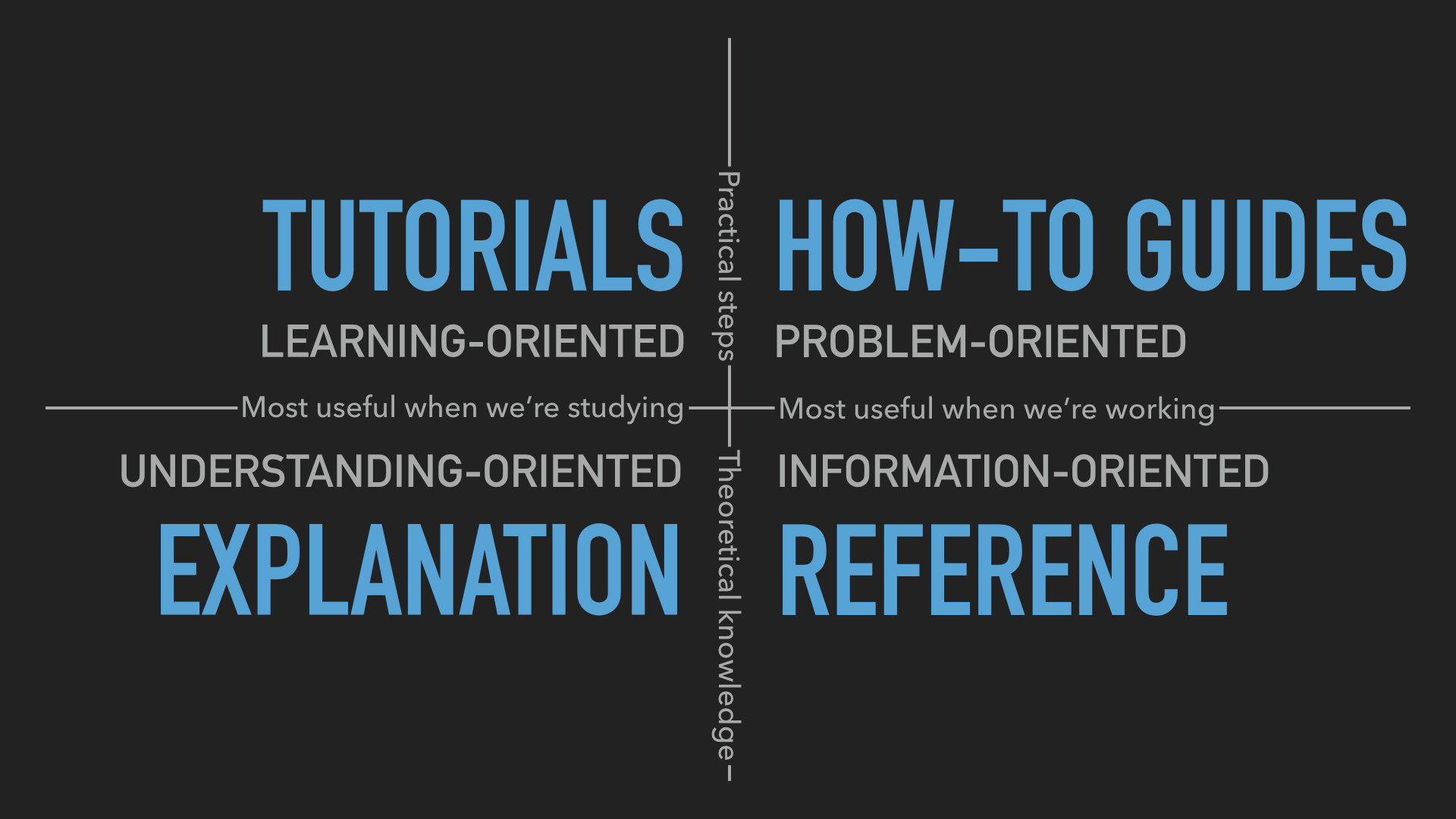
Tutorials and how-to guides are similar because they are both concerned with describing practical steps, while what how-to guides share with technical referenceis that they’re what we need when we are actually at work, coding. Reference guides and explanation are similar because they’re concerned with theoretical knowledge, and finally, what tutorials have in common with explanation is that they are most useful when we are studying, rather than actually working
Difference between tutorials, how-to guides, explanation and reference:
"http://lobid.org/items/HT019025795:DE-Kn3:KMB%2FYG%20BERLINW%2033%20%202016%20A#!"
Durch Folgen der URI gelangt man zu einer Einzelansicht für das Exemplar. Die dort angezeigten Daten sind ebenfalls als JSON-LD verfügbar. Siehe [Link](##### Beschreibung
Durch Folgen der URI gelangt man zu einer Einzelansicht für das Exemplar. Die dort angezeigten Daten sind ebenfalls als JSON-LD verfügbar. Siehe Link für die markierte Ressource.
@angular-react/core
A beginner’s guide to writing
How to document
"classification"
Spezieller Organisationstyp
Diese Klassifikation liefert eine granulare Unterscheidung verschiedener Einrichtungstypen. Das verwendete SKOS-Schema basiert auf der Klassifikation des deutschen ISIL-Verzeichnis.
Zu jeder Institution wird der detaillierte Typ angegeben.
Auflistung aller Bibliotheken, die als Wissenschaftliche Spezialbibliothek klassifiziert sind.
"rs"
Region key
The key of the administrative area the organization is located in.
Only applies to organizations in Germany. Currently missing in more than 2000 entries of institutions in Germany.
It is important to understand the interaction between aggregates and SQL's WHERE and HAVING clauses. The fundamental difference between WHERE and HAVING is this: WHERE selects input rows before groups and aggregates are computed (thus, it controls which rows go into the aggregate computation), whereas HAVING selects group rows after groups and aggregates are computed. Thus, the WHERE clause must not contain aggregate functions; it makes no sense to try to use an aggregate to determine which rows will be inputs to the aggregates. On the other hand, the HAVING clause always contains aggregate functions. (Strictly speaking, you are allowed to write a HAVING clause that doesn't use aggregates, but it's seldom useful. The same condition could be used more efficiently at the WHERE stage.)
WHERE >> AGGREGATE >> HAVING (use aggregate functions)
this is SQL procedural sequence on data querying.
and yes HAVING kind of do almost the same thing in WHERE. but it accepts the grouping and aggregation functions that fails to be in WHERE.
"sameAs"
Name: Weitere Profile
Beschreibung: Profile des Dienstes in sozialen Netzwerken wie Twitter, Instagram, GitHub etc.
Pflichtfeld?: nein
Typ: Array, URL
"license"
Name: Lizenz(en)
Beschreibung: Die Lizenz(en), unter denen die angebotenen Inhalte veröffentlicht sind. Angegeben werden die URL zur Lizenz
Pflichtfeld?: nein
Typ: Array, URL
"dateModified"
Name: Änderungsdatum
Beschreibung: Das letzte Änderungsdatum der Visitenkarte
Pflichtfeld?: ja
Typ: Date, Format ISO 8601
"schemaVersion"
Name: Link zum genutzen Schema
Beschreibung: Link zur genutzen Version des Schemas für dei Validierung der Visitenkarte
Pflichtfeld?: ja
Typ: URL
"serviceType"
Name: Schnittstellentyp
Beschreibung: Die Art der maschinellen Schnittstelle
Pflichtfeld?: nein
Typ: String
Beispielewerte: Search, Sitemap, OAI-PMH, Statistics, embed (oEmbed), Generic_Api
"documentation"
Name: Schnittstellendokumentation
Beschreibung: Ein Link zur Dokumentation der Schnittstelle
Pflichtfeld?: nein
Typ: URL
"serviceUrl"
Name: API-Endpoint
Beschreibung: Der URL des Schnittstellen-Endpunkts
Pflichtfeld?: nein
Typ: URL
"type"
Name: Typ des Objekts
Beschreibung: Angabe der Typen ServiceChannel und WebAPI
Pflichtfeld?: nein
Typ: Array, URL
Werte: ServiceChannel, WebAPI
"addressLocality"
Name: Ort
Beschreibung: Der name des Ortes, in dem der Betreiber sitzt.
Pflichtfeld?: nein
Typ: String
"postalCode"
Name: Postleitzahl
Beschreibung: Die Postleitzahl des Sitzes des betreibers
Pflichtfeld?: nein
Typ: Integer
"streetAddress"
Name: Straße
Beschreibung: Die Straße, in der der Betreiber sitzt
Pflichtfeld?: nein
Typ: String
"addressCountry"
Name: Land
Beschreibung: Das Land, in dem der Betreiber sitzt
Pflichtfeld?: nein
Typ: String
Werte: ISO 3166-1 Codes
"type"
Name: Typ des Objekts
Beschreibung: Angabe des Typs PostalAddress
Pflichtfeld?: ja
Typ: URL
Wert: PostalAddress
"type"
Name: Typ des Objekts
Beschreibung: Angabe des Typs GeoCoordinates
Pflichtfeld?: ja
Typ: URL
Wert: GeoCoordinates
"address"
Name: Adresse
Beschreibung: Die Adresse der Anbieters
"latitude"
Name: Geographische Breite
Pflichtfeld?: nein
Typ: Nummerischer Wert
"longitude"
Name: Geographische Länge
Pflichtfeld?: nein
Typ: Nummerischer Wert
"geo"
Name: Geokoordinaten
Beschreibung: Dieses JSON-Objekt beinhaltet die Angaben zur Geoposition der Einrichtung nach WGS 84.
Pflichtfeld?: nein
Typ:
"location"
Name: Standort
Beschreibung: Im location-Objekt befinden sich Angaben zum Sitz des Anbieters: Anschrift und Geokoordinaten.
Pflichtfeld?: nein
Typ: Objekt
"type"
Name: Typ des Objekts
Beschreibung: Angabe des Typs Place
Pflichtfeld?: ja
Typ: URL
Wert: Place
"email"
Name: E-Mail-Adresse des Anbieters
Beschreibung: Die E-Mail-Adresse des Anbieters
Pflichtfeld?: nein
Typ: Text (Format)
"type"
Name: Typ des Anbieters
Beschreibung: Angabe, ob der Anbieter eine Organisation oder Gruppe (Organization) oder eine Einzelperson (Person) ist.
Pflichtfeld?: ja
Typ: Array, URL
Mögliche Werte: Organization, Person
"name"
Name: Name des Anbieters
Beschreibung: Der Name des Dienstanbieters
Pflichtfeld?: ja
Typ: String
"provider"
Name: Anbieter des Dienstes
Beschreibung: Die Organisation, Gruppe oder Einzelperson, die den Dienst anbietet
Pflichtfeld?: ja
Typ: Array, Objekt
Felder: type (Pflicht), name (Pflicht), email, location, id
"availableChannel"
Name: Schnittstellen des Dienstes
Beschreibung: Angabe von Maschninenschnittstellen zum Dienst, deren Art und Dokumentation.
Pflichtfeld?: ja
Typ: Array, Objekt
Felder: type (Pflicht), serviceURL (Pflicht), serviceType, documentation
"startDate"
Name: Launch-Datum
Beschreibung: Das Datum, an dem der Dienst offiziell gelauncht wurde
Pflichtfeld?: nein
Typ: Date, Format ISO 8601
"isAccessibleForFree"
Name: Zugangsfreiheit
Beschreibung: Ist die Nutzung des Dienstes ohne Zugangsbeschränkungen (Registrierung, Authentifizierung) möglich und die Inhalte ohne Einschränkungen erreichbar?
Pflichtfeld?: nein
Typ: Boolean
"about"
Name: Fach/Thema der Inhalte
Beschreibung: Die Fächer bzw. Themen, zu denen der Dienst Open Educational Resources (OER) anbietet. Die Werte sollten URLs aus einer kontrollierten Liste sein.
Pflichtfeld?: nein
Typ: Array, URL
"audience"
Name: Zielgruppe(n) des Angebotes
Beschreibung: Die Zielgruppe, auf der das Angebot des Dienstes ausgerichtet ist.
Pflichtfeld?: nein
Typ: Array, URL
Werteliste: http://purl.org/dcx/lrmi-vocabs/educationalAudienceRole/
"serviceType"
Name: Art des Dienstes
Beschreibung: Die Art des Dienstes
Pflichtfeld?: ja
Typ: Array, String
Beispielwerte: Repository, Referatory, Wiki, LMS
id
Name: URL als Identifiktator
Beschreibung: Die URL, durch den der Dienst identifiziert wird. Das ist in der Regel die Homepage. Auf dieser URL MUSS die Visitenkarte später findbar / abrufbar sein
Pflichtfeld?: ja
Typ: URL
"name"
Name: Name des Dienstes
Beschreibung: Der Name des OER-Services
Pflichtfeld?: ja
Typ: String
"description"
Name: Beschreibung des Dienstes
Beschreibung: Eine kurze Beschreibung des Dienstes.
Pflichtfeld?: nein
Typ: String
"inLanguage"
Name: Sprache(n) des Hauptangebotes
Beschreibung: Die Sprachen der Open Educational Resources (OER), die der Dienst anbietet.
Pflichtfeld?: nein
Typ: Array, String
"image"
Name: Icon des Dienstes
Beschreibung: Ein Link zu einer Bilddatei mit einem Icon des Dienstes, das etwa zur Kennzeichnung von Einträgen in einer Suchergebnisliste genutzt werden kann. Die verlinkte Datei sollte im Format svg oder png sein und eine Größe von 64x64px haben.
Pflichtfeld?: nein
Typ: URL
Dateiformat: Das verlinkte Bild sollte eine svg- oder png-Datei sein mi8t 64x64px.
"logo"
Name: Logo des Dienstes
Beschreibung: Ein Link zu einer Bilddatei mit dem Logo des Dienstes.
Pflichtfeld?: nein
Typ: URL
"@context"
Name: JSON-LD-Kontext (@context)
Beschreibung: @context ist ein JSON-LD-Keyword, mit dem das JSON-LD-Kontext-Dokument angegeben wird. Es beinhaltet ein Mapping von JSON Keys auf RDF-Properties und von Typen auf RDF-Klassen. Mit dem JSON-LD-Kontext kann aus dem angebotenen JSON, RDF generiert werden.
Pflichtfeld?: ja
Typ: URL
Wert: http://schema.org/
"type"
Name: Typ
Beschreibung: Mit type wird der Typ der durch die Visitenkarte beshriebenen Ressource angegeben. Der Typ wird durch eine URL identifiziert. Durch Nutzung des schema.org-Kontexts lassen sich die URLs kürzen, anstatt http://schema.org/WebSite und http://schema.org/Service können WebSite und Service angegeben werden.
Pflichtfeld?: ja
Typ: Array, URL
Werte: WebSite, Service
after the terminal operation of the stream pipeline commences.
Above is because of the nature of Streams in general: they are lazily executed (or put another way, execution is delayed until the latest convenient method call).
Ce qui est commun aux formes de documentation est la fixation, dans le sens collecte avec indexation, d'informations et de processus stockés menant à une réalisation reproductible et diffusable.
"changeDate"
Change date
The date when the resource description was last changed.
80 % of the records have a change date, while it is missing for 20 %, see here for a pie chart.
"label": "Report of the trial of George Ryan : before the Superior Court at Charlestown, N.H., in the county of Cheshire, May term 1811, for highway robbery."
The label for the work.
Combines the title.mainTitle and title.subtitle fields. This field is set for 98 of 100 works in our test set. It can be queried in a field query with label:*.
It is mapped to rdf-schema#label in our context.
"isil"
ISIL
Der ISIL (International Standard Identifier for Libraries and Related Organizations) der Einrichtung. Das deutschsprachige ISIL-Verzeichnis ist – neben der Deutschen Bibliotheksstatistik (DBS) – die Datenquelle von lobid-organisations.
Alle Einträge aus dem ISIL-Verzeichnis haben einen ISIL, das sind etwa 14000 Einträge.
In der bibliothekarischen Arbeit begegnet man desöfteren ISILs. Mit einem lobid-organisations-Lookup kann einfach und zügig die dadurch identifizierte Institution gefunden werden.
"fundertype"
Art des Unterhaltsträgers
Typ des Unterhaltsträgers der Einrichtung. Die Werte stammen aus einem kontrollierten Vokabular, siehe das SKOS-Schema.
Vorhanden bei gut 7000 Einträgen, fehlt bei ca. 7.700
"type"
Allgemeiner Organisationstyp
Art der Einrichtung. Vergebene Typen sind: Bibliothek (Library), Archiv (Archive), Museum (Museum), Verlag (Publisher), sonstige Organisationen (Organization).
Jeder Eintrag ist einem Einrichtungstyp zugeordnet.
Für Einträge aus der DBS wird automatisch der Typ "Library" vergeben. Bei den Einträgen aus dem Sigelverzeichnis wird der Typ auf Basis der detaillierten Organisationsklassifikation verwendet, siehe das Mapping der Notationen auf einen Typ.
"type" ist auf das JSON-LD-Keyword "@type" gemappt, das in diesem Zusammenhang (als node type) in RDF mit http://www.w3.org/1999/02/22-rdf-syntax-ns#type übersetzt wird.
"isPartOf"
Ist Teil von
Enthält Informationen zum Erscheinen der Ressource als Teil eines übergeordneten Werks (eines, mehrbändigen Werks, einer Serie oder eines Periodikums).
Gut sieben Millionen Einträge sind Teil eines übergeordneten Werkes.
Asterix-Bände der "Mundart"-Reihe in kölschem Dialekt
"license"
License
about.license
A license used within a service providing OER. The values are taken from the controlled vocabulary at https://oerworldmap.org/assets/json/licenses.json.
"dateModified"
Modification data
dateModified
Time stamp for the moment the latest modification of the entry was published.
Every entry has information on the last modification date.
"startDate"
Start date
about.startDate
The date – following ISO 8601 – when the service was launched.
A list of services launched before 2015: https://oerworldmap.org/resource/?q=about.startDate%3A%3C2015&filter.about.%40type=Service
"@id"
Identifier
about.@id
The ID of the described resource. OER World Map uses URN UUIDs for identifying resources as specified in RDF 4122. The URL for the associated entry is https://oerworldmap.org/resource/{id}
You can state identity between OER World Map resources and the same resource on other platforms using sameAs.
Every resource has an id.
"name"
Name
The name of the resource described
Search resources by name
Every resource needs to have a name.
"member"
Affiliated
`about.member''
An organization affiliated with the service
"@type" : "WebPage"
Type
@type
The type of all entries in the OER World Map is "WebPage".
Every entry has the type "WebPage".
"provider"
Provider
about.provider
The provider of a service. This can be an organization or a person.
"@id" : "https://oerworldmap.org/assets/json/sectors.json#general"
Each controlled value has a URL as ID that points to the whole controlled vocabulary it is part of.
"@type" : "Concept"
Values from controlled vocabularies all have the @typeConcept`.
"@context"
JSON-LD context (@context)
@context
@context is a JSON-LD keyword, specifying the JSON-LD context document. It primarily includes a mapping of JSON keys to RDF properties. Based on the JSON-LD context one can convert the data to different RDF serializations from the JSON provided.
The JSON-LD is linked in every entry.
"dateCreated"
Date of creation
dateCreated
The point in time when the first version of the entry was published.
Every entry has a creation date.