🧐 Why is there no event.preventDefault on the button? A <button type="button">, while seemingly redundant, is the HTML way of preventing a button from submitting its form.
785 Matching Annotations
- Nov 2022
-
reactrouter.com reactrouter.com
Tags
Annotators
URL
-
-
bugzilla.mozilla.org bugzilla.mozilla.org
-
not when it is served as text/html
-
occurs when the page is served as application/xhtml+xml
-
interpreted as normal white space for rendering
-
This behavior is incorrect because line breaks in text from HTML source are interpreted as normal white space for rendering.
-
-
blog.logrocket.com blog.logrocket.com
Tags
Annotators
URL
-
-
www.w3.org www.w3.org
-
The character exists in Unicode/ISO 10646, but not in the character encoding used for the document. In this case, use Numeric Character References (NCRs, example: 噸).
-
- Sep 2022
-
wiki.whatwg.org wiki.whatwg.org
Tags
Annotators
URL
-
-
developer.mozilla.org developer.mozilla.org<link>1
Tags
Annotators
URL
-
-
Tags
Annotators
URL
-
-
www.learnwithjason.dev www.learnwithjason.dev
Tags
Annotators
URL
-
-
blog.cloudflare.com blog.cloudflare.com
Tags
Annotators
URL
-
-
blog.cloudflare.com blog.cloudflare.com
Tags
Annotators
URL
-
-
www.jenitennison.com www.jenitennison.com
-
www.jenitennison.com www.jenitennison.com
-
wiki.um.es wiki.um.es
Tags
Annotators
URL
-
-
pepa.holla.cz pepa.holla.cz
-
www.jenitennison.com www.jenitennison.com
-
bibwild.wordpress.com bibwild.wordpress.com
-
www.kanzaki.com www.kanzaki.com
Tags
Annotators
URL
-
-
html.spec.whatwg.org html.spec.whatwg.org
Tags
Annotators
URL
-
-
www.slideshare.net www.slideshare.net
Tags
Annotators
URL
-
-
www.w3.org www.w3.org
-
-
diveinto.html5doctor.com diveinto.html5doctor.com
Tags
Annotators
URL
-
- Aug 2022
-
www.tutorialstonight.com www.tutorialstonight.com
-
Even if the browser ignores the closing slash in void tags, it's good practice to close it because: 1. in frameworks like react js if these are not close, it creates an error 2. if you want your document to be readable by an XML parser then must close all elements
-
-
www.w3.org www.w3.org
-
-
nikitahl.com nikitahl.com
-
```html
<div class="select-container" data-content=""> <select class="select" id="words"> <option value="lorem ipsum dolor sit amet">Lorem ipsum dolor sit amet</option> <option value="lorem">Lorem</option> <option value="ipsum">Ipsum</option> <option value="dolor">Dolor</option> <option value="sit">Sit</option> <option value="amet">Amet</option> </select> </div>css .select { color: transparent; appearance: none; padding: 5px; background: transparent url("https://cdn4.iconfinder.com/data/icons/ionicons/512/icon-arrow-down-b-128.png") no-repeat calc(~"100% - 5px") 7px; background-size: 10px 10px; }.select-container { position: relative; display: inline-block; }
.select-container::before { content: attr(data-content); pointer-events: none; position: absolute; top: 0; right: 10px; bottom: 0; left: 0; padding: 7px; font: 11px Arial, sans-serif; white-space: nowrap; text-overflow: ellipsis; overflow: hidden; text-transform: capitalize; }
js const selectContainer = document.querySelector(".select-container"); const select = selectContainer.querySelector(".select");select.value = "lorem ipsum dolor sit amet"; selectContainer.dataset.content = select.value;
function handleChange(e) { selectContainer.dataset.content = e.currentTarget.value; }
select.addEventListener("change", handleChange); ```
-
-
www.w3.org www.w3.org
Tags
Annotators
URL
-
-
stackoverflow.com stackoverflow.com
-
```html
<div class="select-sim" id="select-color"> <div class="options"> <div class="option"> <input type="radio" name="color" value="" id="color-" checked /> <label for="color-">Select an option </label> </div> <div class="option"> <input type="radio" name="color" value="red" id="color-red" /> <label for="color-red">
Red </label> </div> <div class="option"> <input type="radio" name="color" value="green" id="color-green" /> <label for="color-green">
Green </label> </div> <div class="option"> <input type="radio" name="color" value="blue" id="color-blue" /> <label for="color-blue">
Blue </label> </div> <div class="option"> <input type="radio" name="color" value="yellow" id="color-yellow" /> <label for="color-yellow">
Yellow </label> </div> <div class="option"> <input type="radio" name="color" value="pink" id="color-pink" /> <label for="color-pink">
Pink </label> </div> <div class="option"> <input type="radio" name="color" value="turquoise" id="color-turquoise" /> <label for="color-turquoise">
Turquoise </label> </div> </div> </div>
```
-
-
awwright.github.io awwright.github.io
Tags
Annotators
URL
-
-
workers.tools workers.tools
Tags
Annotators
URL
-
-
developers.cloudflare.com developers.cloudflare.com
-
blog.logrocket.com blog.logrocket.com
-
Sanitizing iframes
```html
<iframe id="webpage"></iframe><br/> <button onclick="sanitize()">Sanitize</button>
<script> function sanitize() { // Create a sanitizer object with the default config const sanitizer = new Sanitizer(); // Find the iframe node const iframe = document.getElementById('webpage'); // Sanitize the iframe's document node const sanitizedFrameNodes = sanitizer.sanitize(iframe.contentWindow.document); iframe.replaceChildren(sanitizeFrameNodes); } </script>```
-
-
developer.mozilla.org developer.mozilla.org
-
developer.mozilla.org developer.mozilla.org
-
The setHTML() method of the Element interface is used to parse and sanitize a string of HTML and then insert it into the DOM as a subtree of the element. It should be used instead of Element.innerHTML for inserting untrusted strings of HTML into an element.
```js const unsanitized_string = "abc <script>alert(1)<" + "/script> def"; // Unsanitized string of HTML const sanitizer1 = new Sanitizer(); // Default sanitizer;
// Get the Element with id "target" and set it with the sanitized string. document.getElementById("target").setHTML(unsanitized_string, {sanitizer: sanitizer1});
// Result (as a string): "abc def" ```
-
-
github.com github.com
-
wicg.github.io wicg.github.io
Tags
Annotators
URL
-
-
developer.mozilla.org developer.mozilla.org
-
webmasters.stackexchange.com webmasters.stackexchange.com
-
developer.mozilla.org developer.mozilla.org
Tags
Annotators
URL
-
-
cheatsheetseries.owasp.org cheatsheetseries.owasp.org
-
If you're using JavaScript for writing to a HTML Attribute, look at the .setAttribute and [attribute] methods which will automatically HTML Attribute Encode. Those are Safe Sinks as long as the attribute name is hardcoded and innocuous, like id or class.
-
If you're using JavaScript for writing to HTML, look at the .textContent attribute as it is a Safe Sink and will automatically HTML Entity Encode.
-
-
stackoverflow.com stackoverflow.com
-
js
function transclude(elementId) {
    var clone = document.getElementById(elementId).cloneNode(true),
        placeholder;
    clone.id = null;
    document.write('<br id="__placeholder__">');
    placeholder = document.getElementById('__placeholder__');
    placeholder.parentNode.insertBefore(clone, placeholder);
    placeholder.parentNode.removeChild(placeholder);
    return transclude;
}
```html
This is paragraph 1.
This is paragraph 2.
This is paragraph 3. It should contain paragraphs 1 and 2. <script>transclude("p1")("p2")</script>
```
-
-
wangdoc.com wangdoc.com
-
这种单独使用的标签,通常是因为标签本身就足够完成功能了,不需要标签之间的内容。实际应用中,它们主要用来提示浏览器,做一些特别处理
为什么标签不需要结束标签?#share
-
- Jul 2022
-
www.phpied.com www.phpied.com
-
And immediately after it, the 2 CSS downloads begin. What we want to do is move the CSS downloads to the left, so all rendering starts (and finishes!) sooner. So all you do it take the URLs of these two files and add them to .htaccess with H2PushResource in front. For me that means the URL to my custom theme's CSS /wp-content/themes/phpied2/style.css as well as some WordPress CSS stuff. While I was there I also added a JavaScript file which is loaded later. Why now start early? So the end result is:
WordPress tip to start loading some CSS and JS files earlier.
Sample code to add to
.htaccess:H2PushResource /wp-content/themes/phpied2/style.css H2PushResource /wp-includes/css/dist/block-library/style.min.css?ver=5.4.1 H2PushResource /wp-includes/js/wp-emoji-release.min.js?ver=5.4.1
-
-
datatracker.ietf.org datatracker.ietf.org
-
educational-innovation.sydney.edu.au educational-innovation.sydney.edu.au
-
An article discussing the creation of custom HTML and CSS for blackboard
-
- Jun 2022
-
css-tricks.com css-tricks.com
Tags
Annotators
URL
-
-
blogs.perficient.com blogs.perficient.com
-
developer.mozilla.org developer.mozilla.org
-
developer.mozilla.org developer.mozilla.org
-
batumi.estate batumi.estate
-
-
docs.angularjs.org docs.angularjs.org
-
Lots of info on form validation
Tags
Annotators
URL
-
-
storybook.js.org storybook.js.org
-
-
developer.mozilla.org developer.mozilla.org
-
The dataset read-only property of the HTMLElement interface provides read/write access to custom data attributes (data-*) on elements. It exposes a map of strings (DOMStringMap) with an entry for each data-* attribute.
```html
<div id="user" data-id="1234567890" data-user="johndoe" data-date-of-birth>John Doe</div>```
```js const el = document.querySelector('#user');
// el.id === 'user' // el.dataset.id === '1234567890' // el.dataset.user === 'johndoe' // el.dataset.dateOfBirth === ''
// set a data attribute el.dataset.dateOfBirth = '1960-10-03'; // Result on JS: el.dataset.dateOfBirth === '1960-10-03' // Result on HTML: <div id="user" data-id="1234567890" data-user="johndoe" data-date-of-birth="1960-10-03">John Doe</div>
delete el.dataset.dateOfBirth; // Result on JS: el.dataset.dateOfBirth === undefined // Result on HTML: <div id="user" data-id="1234567890" data-user="johndoe">John Doe</div>
if ('someDataAttr' in el.dataset === false) { el.dataset.someDataAttr = 'mydata'; // Result on JS: 'someDataAttr' in el.dataset === true // Result on HTML: <div id="user" data-id="1234567890" data-user="johndoe" data-some-data-attr="mydata">John Doe</div> } ```
-
-
developer.mozilla.org developer.mozilla.org
-
Using the download attribute to save a <canvas> as a PNGTo save a <canvas> element's contents as an image, you can create a link with a download attribute and the canvas data as a data: URL: Example painting app with save link
```html
Paint by holding down the mouse button and moving it. Download my painting
<canvas width="300" height="300"></canvas>```
css
html {
  font-family: sans-serif;
}
canvas {
  background: #fff;
  border: 1px dashed;
}
a {
  display: inline-block;
  background: #69c;
  color: #fff;
  padding: 5px 10px;
}
```js var canvas = document.querySelector('canvas'), c = canvas.getContext('2d'); c.fillStyle = 'hotpink';
function draw(x, y) { if (isDrawing) { c.beginPath(); c.arc(x, y, 10, 0, Math.PI*2); c.closePath(); c.fill(); } }
canvas.addEventListener('mousemove', event => draw(event.offsetX, event.offsetY) ); canvas.addEventListener('mousedown', () => isDrawing = true); canvas.addEventListener('mouseup', () => isDrawing = false);
document.querySelector('a').addEventListener('click', event => event.target.href = canvas.toDataURL() ); ```
Tags
Annotators
URL
-
-
javascript.info javascript.info
Tags
Annotators
URL
-
-
developer.mozilla.org developer.mozilla.org
-
Highlight part of an element This example uses the Range.setStart() and Range.setEnd() methods to add part of an address to a range. The selected range is then highlighted using Range.surroundContents(). The address contains nine nodes: five text nodes, and four <br> elements.
```html
Wyatt Earp<br> 101 E. Main St.<br> Dodge City, KS<br> 67801<br> USA
Nodes in the original address:
```
```js const address = document.getElementById('address'); const log = document.getElementById('log');
// Log info address.childNodes.forEach(node => { const li = document.createElement('li'); li.textContent =
${node.nodeName}, ${node.nodeValue}; log.appendChild(li); });// Highlight the street and city const startOffset = 2; // Start at third node: 101 E. Main St. const endOffset = 5; // End at fifth node: Dodge City, KS const range = document.createRange(); range.setStart(address, startOffset); range.setEnd(address, endOffset);
const mark = document.createElement('mark'); range.surroundContents(mark); ```
-
-
developer.chrome.com developer.chrome.com
Tags
Annotators
URL
-
-
people.dsv.su.se people.dsv.su.se
Tags
Annotators
URL
-
-
blog.logrocket.com blog.logrocket.com
-
```js import DOMPurify from 'dompurify'
const App = () => { const data =
lorem <b onmouseover="alert('mouseover');">ipsum</b>const sanitizedData = () => ({ __html: DOMPurify.sanitize(data) })return ( <div dangerouslySetInnerHTML={sanitizedData()} /> ); }
export default App; ```
-
-
cyber.harvard.edu cyber.harvard.edu
-
Tags
Annotators
URL
-
-
css-tricks.com css-tricks.com
-
www.webpagetest.org www.webpagetest.org
Tags
Annotators
URL
-
- May 2022
-
developer.mozilla.org developer.mozilla.org
-
```html
Choose your monster's colors:
<div> <input type="color" id="head" name="head" value="#e66465"> <label for="head">Head</label> </div> <div> <input type="color" id="body" name="body" value="#f6b73c"> <label for="body">Body</label> </div>```
```js colorPicker.addEventListener("input", updateFirst, false); colorPicker.addEventListener("change", watchColorPicker, false);
function watchColorPicker(event) { document.querySelectorAll("p").forEach(function(p) { p.style.color = event.target.value; }); } ```
-
-
stackoverflow.com stackoverflow.com
-
Following the newer definition, the aside element should be inside of the section element to which it is related. The main element is not a sectioning element (elements like article, section, body, figure etc. are). You can of course still place aside in main, but it will be related to the nearest sectioning element parent of main. That means there is no semantic difference (for aside) in these two examples:
```html
<body> <main></main> <aside></aside> </body> <body> <main> <aside></aside> </main> </body>```
-
-
stackoverflow.com stackoverflow.com
-
css
html, body {
  height: 100%;
  margin: 0;
}
.wrapper {
  height: 100%;
  display: flex;
  flex-direction: column;
}
.header, .footer {
  background: silver;
}
.content {
  flex: 1;
  overflow: auto;
  background: pink;
}
```html
<div class="wrapper"> <div class="header">Header</div> <div class="content"> <div style="height:1000px;">Content</div> </div> <div class="footer">Footer</div> </div>```
-
-
stackoverflow.com stackoverflow.com
-
developer.mozilla.org developer.mozilla.org
-
Differences from innerHTML Element.innerHTML returns HTML, as its name indicates. Sometimes people use innerHTML to retrieve or write text inside an element, but textContent has better performance because its value is not parsed as HTML. Moreover, using textContent can prevent XSS attacks.
-
Differences from innerText Don't get confused by the differences between Node.textContent and HTMLElement.innerText. Although the names seem similar, there are important differences: textContent gets the content of all elements, including <script> and <style> elements. In contrast, innerText only shows "human-readable" elements. textContent returns every element in the node. In contrast, innerText is aware of styling and won't return the text of "hidden" elements. Moreover, since innerText takes CSS styles into account, reading the value of innerText triggers a reflow to ensure up-to-date computed styles. (Reflows can be computationally expensive, and thus should be avoided when possible.) Both textContent and innerText remove child nodes when altered, but altering innerText in Internet Explorer (version 11 and below) also permanently destroys all descendant text nodes. It is impossible to insert the nodes again into any other element or into the same element after doing so.
-
-
github.com github.com
-
html
<md>
  # Markdown Support
     Awesomeness
</md>
html <github-md># Example </github-md>
-
-
web.simmons.edu web.simmons.edu
-
-
www.w3.org www.w3.org
-
Summary of Attributes
-
about: Specifies the subject of a relationship. If not given, then the subject is the current document.
-
rel : Defines a relation between the subject and a URL given by either
hreforresource. The subject is either specified by the closest about or src attribute, @@ -
rev : The same as the the
relattribute, except that subject and object are reversed. -
property : Defines a relationship between the subject and either a string (if the
contentattribute is present) or a piece of markup otherwise (thecontentof the element that the property attribute is on). -
content : Specifies a string to use as an object for the
propertyattribute -
href : Specifies an object URI for the
revandrelattributes. <mark>Takes precedence over theresourceattribute</mark>. -
resource : Specifies an object URI for the
revandrelattributes ifhrefis not present. -
src : Specifies the subject of a relationship.
-
datatype : Specifies a datatype of the object of the
propertyattribute (either in thecontentattribute, or the content of the element that thedatattypeattribute is on.) By default, data in the content attribute is of typestring, and data in the content of an element has typexml:Literal. Ifdatatype=""is used, then for the RDF the element content is stripped of markup, and is of type string. -
typeof : Creates a blank node, which becomes the subject, and asserts that the current element contains relationships that match the given RDF type.
-
Tags
Annotators
URL
-
-
www.thoughtco.com www.thoughtco.com
-
theodi.org theodi.org
-
The simplest way to publish a description of your dataset is to publish DCAT metadata using RDFa. RDFa allows machine-readable metadata to be embedded in a webpage. This means that publishing your dataset metadata can be easily achieved by updating the HTML for your dataset homepage.
```html
<html prefix="dct: http://purl.org/dc/terms/ rdf: http://www.w3.org/1999/02/22-rdf-syntax-ns# dcat: http://www.w3.org/ns/dcat# foaf: http://xmlns.com/foaf/0.1/"> <head> <title>DCAT in RDFa</title> </head> <br /> <body> <div typeof="dcat:Dataset" resource="http://gov.example.org/dataset/finances">
Example DCAT Dataset
25th October 2010
10th March 2013
This is the description.
<div property="dct:license" resource="http://reference.data.gov.uk/id/open-government-licence"> <span property="dct:title">UK Open Government Licence (OGL)</span> </div> <div property="dct:publisher" resource="http://example.org/publisher"> <span property="foaf:name">Example Publisher</span> </div> <div> <span property="dcat:keyword">Examples</span>, <span property="dcat:keyword">DCAT</span> </div> <div> Weekly </div> <div property='dcat:distribution' typeof='dcat:Distribution'> <span property="dct:title">CSV download</span>
- Format <span content='text/csv' property='dcat:mediaType'>CSV</span>
- Size <span content='240585277' datatype='xsd:decimal' property='dcat:byteSize'>1024MB</span>
- Issues <span property='dct:issued'>2012-01-01</span>
</html> ```
Tags
Annotators
URL
-
-
developer.twitter.com developer.twitter.com
-
www.ariadne.ac.uk www.ariadne.ac.uk
-
-
You just gotta love the resilience of the old school web.
Tags
Annotators
URL
-
-
justinjackson.ca justinjackson.ca
-
And when you publish HTML to a server that you control; that's fucking powerful.
-Justin Jackson
Tags
Annotators
URL
-
-
htmldom.dev htmldom.dev
Tags
Annotators
URL
-
-
www.smashingmagazine.com www.smashingmagazine.com
-
css-tricks.com css-tricks.com
-
There are three major HTML elements involved in quotations: <blockquote> <q> <cite>
-
-
gist.github.com gist.github.com
-
Markdown's supported, as long as you have a blank line between the </summary> tag and the following content.
-
-
github.com github.com
-
stackoverflow.com stackoverflow.com
-
```html
<iframe width="420" height="345" src="http://www.youtube.com/embed/oHg5SJYRHA0?autoplay=1" frameborder="0" allowfullscreen></iframe>```
-
- Apr 2022
-
css-tricks.com css-tricks.com
Tags
Annotators
URL
-
-
web.dev web.dev
Tags
Annotators
URL
-
-
www.aaronsw.com www.aaronsw.com
Tags
Annotators
URL
-
-
ourcodeworld.com ourcodeworld.com
-
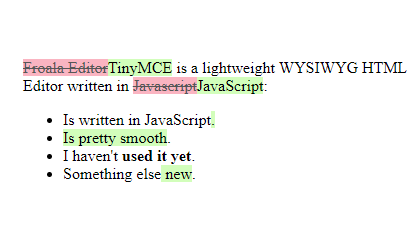
``js
let originalHTML =
Hello Mr. Wayne, decide what to do:
- Call Alfred
- Take Thalia Al Gul to the cinema
- Save Gotham
let newHTML = `
Hello Batman, decide what to do:
- Kill The Joker
- Save Thalia Al Gul
- Save Gotham
<span>Use the batarang to choose an option.</span> `;
// Diff HTML strings let output = htmldiff(originalHTML, newHTML);
// Show HTML diff output as HTML (crazy right?)! document.getElementById("output").innerHTML = output; ```
```css ins { text-decoration: none; background-color: #d4fcbc; }
del { text-decoration: line-through; background-color: #fbb6c2; color: #555; } ```
-
-
diff2html.xyz diff2html.xyz
-
-
www.codeinwp.com www.codeinwp.com
Tags
Annotators
URL
-
-
www.smashingmagazine.com www.smashingmagazine.com
- Mar 2022
-
codepen.io codepen.io
-
-
jamstack.org jamstack.org
Tags
Annotators
URL
-
-
headlessui.dev headlessui.dev
Tags
Annotators
URL
-
-
tailblocks.cc tailblocks.cc
-
-
www.youtube.com www.youtube.com
-
-
blog.mozilla.org blog.mozilla.org
-
flowbite.com flowbite.com
-
play.tailwindcss.com play.tailwindcss.com
Tags
Annotators
URL
-
-
www.youtube.com www.youtube.com
-
https://www.youtube.com/watch?v=rTSEr0cRJY8
Starts out with four and a half minutes of anti-crypto and Web3 material. Presumably most of her audience is in the web3 space.
http://youvegotkat.neocities.org
Neocities: http://neocities.org
The Yesterweb: http://yesterweb.org
Marginalia Search: https://search.marginalia.nu/explore/random
It [the IndieWeb] is so so queer. Like it's super gay, super trans, super good.
The indie web also questions tech solutionism which often attempts to solve human problems by removing the human element. But easily the most remarkable and powerful thing about the internet is the ability it has to connect us with one another.
-
-
developer.mozilla.org developer.mozilla.org
-
The HTMLLabelElement.htmlFor property reflects the value of the for content property.
-
-
pandoc.org pandoc.org
-
-
css-tricks.com css-tricks.com
Tags
Annotators
URL
-
-
doi2ht.ml doi2ht.ml
-
-
jsfiddle.net jsfiddle.net
-
-
www.ebusiness-unibw.org www.ebusiness-unibw.org
Tags
Annotators
URL
-
-
lexoral.com lexoral.com
Tags
Annotators
URL
-
- Feb 2022
-
-
Someone is cleverly converting arXiv pages into responsive HTML5.
View any arXiv article URL by changing the X to a 5
Tags
Annotators
URL
-
-
output.jsbin.com output.jsbin.comJS Bin1
Tags
Annotators
URL
-
-
bl.ocks.org bl.ocks.org
-
gist.github.com gist.github.com
-
www.maissan.net www.maissan.net
Tags
Annotators
URL
-
- Jan 2022
-
w3c.github.io w3c.github.io
-
Scholarly HTML is a domain-specific rich document format built entirely on open standards that enables the interoperable exchange of scholarly articles in a manner that is compatible with off-the-shelf browsers. This document describes how Scholarly HTML works and how it is encoded.
Tags
Annotators
URL
-
-
gist.github.com gist.github.com
-
// ==UserScript==
// @name        Hypothes.is Better Title
// @description Rewrite titles of Hypothesis users page for better bookmarking
// @author      https://github.com/kael
// @see         https://github.com/hypothesis/support/issues/257
// @version     1
// @grant       none
// @include      https://hypothes.is/users/*
// ==/UserScript==

window.onload = () => document.title = `Hypothesis / ${window.location.pathname.split("/users/")[1]}`;
-
-
web.hypothes.is web.hypothes.is
-
First, here’s a magic trick you might not realize Hypothesis has up its sleeve. Consider this PLOS One article. Annotate it in one tab, then open a second tab and annotate the PDF version there. You’ll see both annotations in both tabs. How is that possible?
The answer is that when scholarly publishers provide HTML versions of articles, they typically include metadata that points to PDF versions of the same articles. Here’s one way that happens:
<meta name=”citation_pdf_url” content=”http://journals.plos.org/plosone/article/file?id=10.1371/journal.pone.0168597&type=printable”>Hypothesis remembers the correspondence between the HTML and PDF versions, and coalesces annotations across them.
-
-
robustlinks.mementoweb.org robustlinks.mementoweb.org
Tags
Annotators
URL
-
-
robustlinks.mementoweb.org robustlinks.mementoweb.org
-
4. Robustifying a link when linking to a specific version
If the main intent is to link to a specific state of an original resource, for example a snapshot of the original resource in a web archive or one of its version in a version control system, then Robust Link information is conveyed as follows:
hreffor the URI that provides the specific state i.e., the snapshot or resource version;data-originalurlfor the URI of the original resource;data-versiondatefor the datetime of the snapshot or resource version.
[...]
<a href="http://en.wikipedia.org/w/index.php?title=Web_archiving&oldid=485347845" data-originalurl="http://en.wikipedia.org/wiki/Web_archiving" data-versiondate="2012-03-20">Robust Link to this specific version of the Wikipedia page</a> -
3. Robustifying a link when linking to the original resource
If the main intent is to link to an original resource but also allow future users of that link to see the state of the original resource around the time the link was put in place, then Robust Link information is conveyed as follows:
hreffor the URI of the original resource for which the snapshot was taken;data-versionurlfor the URI of the snapshot;data-versiondatefor the datetime of linking, of taking the snapshot.
[...]
<a href="http://www.w3.org/" data-versionurl="https://archive.today/r7cov" data-versiondate="2015-01-21">Robust Link to the W3C home page</a> -
The approach proposed here is to convey this information on a link by leveraging HTML5's attribute extensibility mechanism. It introduces the following
data-attributes for the anchor (<a>) element:data-originalurlfor the URI of the original resource;data-versionurlfor the URI of the snapshot;data-versiondatefor the datetime of linking, of taking the snapshot.
Tags
Annotators
URL
-
-
-
<link rel="prefetch" href="/style.css" as="style" />
<link rel="preload" href="/style.css" as="style" />
<link rel="preconnect" href="https://example.com" />
<link rel="dns-prefetch" href="https://example.com" />
<link rel="prerender" href="https://example.com/about.html" />
<link rel="modulepreload" href="/script.js" />
-
-
github.com github.com
-
www.monperrus.net www.monperrus.net
-
scholar.google.com scholar.google.com
Tags
Annotators
URL
-
-
stackoverflow.com stackoverflow.com
-
although if you are using XMLDOM with JavaScript you can code something like var n1 = uXmlDoc.selectSingleNode("//bookstore/book[1]/title/@lang"); and n1.text will give you the value "eng"
- TEST, value: "selected".text
-
@KorayTugay, No, the first expression selects, doesn't "return" -- a set of nodes, and this set of nodes is not a string. A node is not a string -- a node is a node in a tree. An XML document is a tree of nodes. lang="eng" is just one of many textual representations of an attribute node that has a name "lang", doesn't belong to a namespace, and has a string value the string "eng" – Dimitre Novatchev Oct 22 '14 at
- OK: select, not value
-
-
stackoverflow.com stackoverflow.com
-
//Parent[@id='1']/Children/child/@name will only output the name attribute of the 4 child nodes belonging to the Parent specified by its predicate [@id=1]. You'll then need to change the predicate to [@id=2] to get the set of child nodes for the next Parent. However, if you ignore the Parent node altogether and use: //child/@name you can select name attribute of all child nodes in one go.
- OK, select ALL
-
//Parent[@id='1']/Children/child/@name Your original child[@name] means an element child which has an attribute name. You want child/@name.
- OK: /@name
-
So far I have this XPath string: //Parent[@id='1']/Children/child[@name]
- [@name] NO SELECCIONA, sino que FILTRA!
- ver respuesta "382"
-
-
joshgoestoflatiron.medium.com joshgoestoflatiron.medium.com
-
function parseLinkHeader( linkHeader ) {
   const linkHeadersArray = linkHeader.split( ", " ).map( header => header.split( "; " ) );
   const linkHeadersMap = linkHeadersArray.map( header => {
      const thisHeaderRel = header[1].replace( /"/g, "" ).replace( "rel=", "" );
      const thisHeaderUrl = header[0].slice( 1, -1 );
      return [ thisHeaderRel, thisHeaderUrl ]
   } );
   return Object.fromEntries( linkHeadersMap );
}
-
- Dec 2021
-
developer.mozilla.org developer.mozilla.org
-
Referencia HTML
-
-
-
-
css-tricks.com css-tricks.com
-
-
app.htmlplanetforkids.com app.htmlplanetforkids.com
-
www.fil.univ-lille1.fr www.fil.univ-lille1.fr
-
diveintohtml5.info diveintohtml5.info
Tags
Annotators
URL
-
-
150daysofhtml.substack.com 150daysofhtml.substack.com
-
Most of the metadata about our document lives in the head of the document, and it makes perfect sense. Most information about our bodies also live in our head.
Metadata placement.
Tags
Annotators
URL
-
-
a11yweekly.com a11yweekly.com
-
Welcome to Accessibility WeeklyA weekly dose of web accessibility to help you bring it into your everyday work. Delivered to your inbox each Monday, curated by David A. Kennedy.
a11y Weekly is about web accessibility. How to make the web user friendly to everyone.
Tags
Annotators
URL
-
-
oli.cmu.edu oli.cmu.edu
-
Please provide a thoughtful reply.
-
- Nov 2021
-
www.interviewbit.com www.interviewbit.com
-
Front end framework is a combination of two separate words, Front end + Framework. Front end is the visual site of any web application or a website, it is that part of the website with which a user interacts, note that backend is that part that involves API calls, database connectivity, authentication and so on, and a framework in literal sense means an essential supporting structure of an object, the object is a website in this case.
What's Front End Frameworks? Here's the complete guide to understand the best front end frameworks.
-
- Sep 2021
-
doi2ht.ml doi2ht.ml
-
This website helps you convert your boring old DOI to a fully semantic HTML5 citation. https://doi2ht.ml/
Tags
Annotators
URL
-
-
www.freecodecamp.org www.freecodecamp.org
- Aug 2021
-
stackoverflow.com stackoverflow.com
-
Th part of an URI after the # is called "fragment" and is by definition only available/processed on client side (see https://en.wikipedia.org/wiki/Fragment_identifier).
-
The main problem is that the browser won't even send a request with a fragment part. The fragment part is resolved right there in the browser. So it's reachable through JavaScript.
-
-
googlechrome.github.io googlechrome.github.io
-
"intrinsicSize" attribute tells the browser to ignore the actual intrinsic size of the image and pretend it's the size specified in the attribute
-
-
weasyprint.org weasyprint.org
-
WeasyPrint is a smart solution helping web developers to create PDF documents. It turns simple HTML pages into gorgeous:
Tool mentioned in IndieWeb chat. Could be used to turn a site into a physical book.
Tags
Annotators
URL
-
- Jun 2021
-
pretextbook.org pretextbook.orgPreTeXt1
-
An uncomplicated XML vocabulary for authors of research articles, textbooks, and monographs. The best of DocBook, LaTeX, and HTML. Outputs: print, PDF, web, EPUB, Jupyter Notebooks, … (Before June 2017, PreTeXt was called “MathBook XML”, so many of those references remain.)
A tool mentioned by Alex Enkerli at I Annotate 2021.
Tags
Annotators
URL
-
- May 2021
-
www.diveintomark.link www.diveintomark.link
-
why do we have an <img> element? Why not an <icon> element? Or an <include> element? Why not a hyperlink with an include attribute, or some combination of rel values? Why an <img> element? Quite simply, because Marc Andreessen shipped one, and shipping code wins.That’s not to say that all shipping code wins; after all, Andrew and Intermedia and HyTime shipped code too. Code is necessary but not sufficient for success. And I certainly don’t mean to say that shipping code before a standard will produce the best solution.
Shipping code is necessary, but not sufficient for success.
-
-
webdesign.tutsplus.com webdesign.tutsplus.com
-
-
However, as powerful as the <picture> element is, sometimes it gives us more power than is actually needed to achieve suitable responsiveness. Sometimes all it really takes is a regular <img> element using the srcset and sizes attributes inline.
-
-
-
That image only contains 200 pixels horizontally, but the browser stretches it to 400px wide or even farther!Luckily, you’ll see there’s an easy “fix” there at the end: our old good friend the width attribute!<img src="example.gif", srcset="example.gif 200w" sizes="(min-width: 400px) 400px, 100vw" width="200" /* <=== TA-DA! */ class="logo">As long as you can specify the width attribute so it reflects the true maximum size of your largest image, you won’t run into this problem of having sizes make your image wider than it naturally should go.
-
The selected source size affects the intrinsic size of the image (the image’s display size if no CSS styling is applied).
-
Of course in the world of responsive images, we put constraints on our images with CSS:img { max-width: 100%;}Now the image appears at it’s natural size unless it’s constrained by the parent container! Excellent.
-
-
www.impressivewebs.com www.impressivewebs.com
-
The simple problem that I see with fragment identifiers is that their existence and functionality relies completely on the developer rather than the browser. Yes, the browser needs to read and interpret the identifier and identify the matching fragment. But if the developer doesn’t include any id attributes in the HTML of the page, then there will be no identifiable fragments. Do you see why this is a problem? Whether the developer has coded identifiers into the HTML has nothing to do with whether or not the page actually has fragments. Virtually every web page has fragments. In fact, sectioning content as defined in the HTML5 spec implies as much. Every element on the page that can contain content can theoretically be categorized as a “fragment”.
at the mercy of author
-
This means that, regardless of what the developer has done behind the scenes in the HTML, all HTML fragments on that page should be identifiable by external referrers.
-
-
stackoverflow.com stackoverflow.com
-
There is a fundamental weakness in the name attribute, which the id attribute addresses: the name attribute is not required to be unique. This is OK for forms where you can have multiple elements with the same name, but unsuitable for the rest of the document where you are trying to uniquely identify an element.
-
-
simonstl.com simonstl.com
-
-
HTML fragment identifiers, as defined in the registration for the text/html media type [RFC2854] operate on id attributes and (now less frequently) the name attribute of the a, applet, frame, iframe, img and map elements.
-
-
stackoverflow.com stackoverflow.com
-
[gripe]Email is supposed to be a text-only medium. I can concede a need for rich text - the occasional bold or italic - but background pictures are just needless bloat.[/gripe]
-
Negative margins are in many cases equivalent to position:relative; with negative position, e.g. position:relative; top:-100px, as in Guffa's answer.
-
I used to pull stunts like this all the time as soon as tables came. Really ugly, and may seriously embarrass any validator you run it trough: overlapping table cells. Works in most browsers though and even without css.
-
-
backgrounds.cm backgrounds.cm
Tags
Annotators
URL
-
-
stackoverflow.com stackoverflow.com
-
Negative margins get removed by Gmail and others. So, no negative margins.
-
-
stackoverflow.com stackoverflow.com
-
You can't use negative margin in html email. To mimic this, there are 2 ways to do it, the nested tables way and the more complex rowspan way:
-
-
-
You may have noticed your emails looking a little cramped in Hotmail and Outlook.com recently. The culprit? Discontinuation of support for the margin property in these email clients. Rather than honoring your carefully spaced paragraphs and images, Hotmail and Outlook.com are now completely stripping margin from paragraph tags, leaving default values (0 for the top, right and left; 1.35em for the bottom, to be exact) in their place.
-
-
stackoverflow.com stackoverflow.com
-
Negative values are mostly unsupported in html email. So is CSS position. For webmail at least, this is so that your email doesn't render outside of the desired window. Imagine Gmail with your CSS or email affecting the interface - they've limited the CSS you can use specifically to prevent this.
-