- csv export only
- did not seem to export full item list ?
263 Matching Annotations
- Jul 2026
-
-
-
-
github.com github.com
-
claude.ai claude.ai
Tags
Annotators
URL
-
- Jun 2026
- May 2026
-
-
Turns out HTML is the most suitable cross-platform document format for desktop publishing, just like it's always been.
-
- Apr 2026
-
-
User Agents are a Form of Collective Bargaining
大多数人认为浏览器只是简单的工具,帮助用户访问网站,但作者将其重新概念化为'集体谈判'的形式,认为浏览器代表用户与网站进行利益平衡。这个观点挑战了我们对浏览器功能的传统认知,暗示它实际上是一种复杂的权力平衡机制。
-
-
-
Some privacy related extensions may cause issues on x.com.
这句话暗示了隐私保护工具与主流社交平台之间的潜在冲突。这反映了数字隐私与平台商业利益之间的张力。用户安装隐私扩展通常是为了保护数据不被收集,但平台可能将这些工具视为干扰其数据收集和分析的障碍。这种冲突预示着未来网络环境中隐私保护与平台功能之间的持续博弈。
-
-
-
Some privacy related extensions may cause issues on x.com.
这句话暗示了隐私保护工具与主流网站服务之间的潜在冲突。这反映了数字时代的一个核心矛盾:用户想要保护自己的隐私,而平台则需要收集数据来提供个性化服务。这种冲突可能导致用户在隐私和便利性之间做出艰难选择。
-
-
-
Please enable JavaScript or switch to a supported browser to continue using x.com.
这句话揭示了平台对特定技术栈的强制性要求,反映了数字世界的排他性。这种技术壁垒可能无意中边缘化了使用非主流浏览器的用户群体,引发关于数字可及性和技术民主化的讨论。
-
-
-
You can see a list of supported browsers in our Help Center.
这种对特定浏览器的依赖性创造了技术壁垒,限制了数字包容性。这引发了关于Web标准与商业平台之间张力的思考:平台是应该遵循开放Web标准,还是优先考虑特定技术栈的优化?
-
Some privacy related extensions may cause issues on x.com.
这是一个令人惊讶的声明,暗示社交媒体平台可能主动阻止用户使用隐私保护工具。这可能表明X平台的数据收集策略与用户隐私保护之间存在根本冲突,值得深入研究其商业模式与用户权利的平衡问题。
-
-
-
You can see a list of supported browsers in our Help Center.
这个看似常规的提示实际上揭示了Web生态系统的碎片化问题。平台需要明确列出支持的浏览器,暗示了不同浏览器实现标准的差异,以及开发者需要为不同环境适配的额外负担。这种碎片化是Web开发持续面临的挑战。
-
Some privacy related extensions may cause issues on x.com.
这是一个令人深思的矛盾点:本应保护用户隐私的浏览器扩展反而可能导致平台功能失效。这暗示了X(前Twitter)的某些功能可能依赖于数据收集,与用户隐私保护存在根本性冲突,反映了数字服务中隐私与功能的持续博弈。
-
-
-
Some privacy related extensions may cause issues on x.com.
这句话暗示了一个令人深思的悖论:用户安装隐私保护工具(如广告拦截器、隐私增强扩展)来保护自己的数据,但这些工具反而可能阻止他们访问平台。这揭示了平台利益与用户隐私保护之间的冲突,以及现代互联网服务对用户数据的依赖程度。
-
-
github.com github.com
-
Add cloud browser provider system (Kernel + Browserbase)
该项目引入了云浏览器提供商系统,这是一个重要的架构创新。通过支持Kernel和Browserbase等云浏览器服务,该工具能够在云端运行浏览器自动化任务,解决了本地环境配置复杂、资源有限的问题,为大规模浏览器自动化提供了可扩展的解决方案。
-
The AI toolkit for building and maintaining browser automations
这个项目将AI技术与浏览器自动化相结合,代表了一个令人兴奋的研究方向。将AI模型与浏览器自动化工具集成,可以创建能够理解网页内容、进行复杂交互并自主解决问题的智能自动化系统,这大大扩展了传统自动化工具的能力边界。
-
-
-
a quantized 1.7B model (just 290MB in size) can run at ~100 tokens per second entirely in your browser
令人惊讶的是:如此庞大的语言模型(17亿参数)可以被压缩到仅290MB,并在浏览器中以每秒100个token的速度运行,这展示了模型量化技术的惊人进步,使得复杂的AI模型可以在普通设备上高效运行。
-
-
-
Claude just got real browser control. This will change everything. Not screenshots. Not fragile selectors. Not slow MCP loops.
令人惊讶的是:AI浏览器控制已经从简单的截图和选择器发展到实时运行真实浏览器代码的重大飞跃,这代表了人机交互方式的根本性变革,大多数人尚未意识到这种技术范式转变的深远影响。
-
-
yaseenghanem.com yaseenghanem.com
-
by "saving" the webpage (`file->save as`) instead of downloading it (which Safari automatically adds an extension for) I could force it to save it as `malicious_file` (with no extension).
大多数人认为浏览器的保存功能是安全的,会自动处理文件扩展名以确保文件类型正确。但作者发现,通过使用非标准的Content-Type和保存网页功能,可以绕过Safari的安全检查,保存任意扩展名的文件,这打破了人们对浏览器文件处理安全机制的普遍认知。
-
- Jan 2026
-
simonwillison.net simonwillison.net
-
I remain deeply concerned about the safety implications of these new tools. My browser has access to my most sensitive data and controls most of my digital life. A prompt injection attack against a browsing agent that can exfiltrate or modify that data is a terrifying prospect.
yup, very much. Counteracts n:: Doc Searls' my browser is my castle doctrine. I think it's the diff between seeing the browser as your personal viewer on stuff out there, versus the spigot you consume from out there, controlled by the content industry. Browser as personal tool vs consumer jack
Tags
Annotators
URL
-
- Apr 2025
-
nextjs.org nextjs.org
-
Non-NEXT_PUBLIC_ environment variables are only available in the Node.js environment, meaning they aren't accessible to the browser (the client runs in a different environment).
-
- Feb 2025
-
github.com github.com
-
help.vivaldi.com help.vivaldi.com
-
Create a new Note from a web page To make a note of something you found on a web page: Select the text you want to turn into a note; In the menu that appears, choose Copy to Note. The note will be added to the folder you viewed last.
I wish this appended the URL of the excerpt to the note.
-
-
- Jul 2024
-
-
Barcode Writer in Pure JavaScript
-
- May 2024
- Feb 2024
-
-
Open the Safari app on your iPhone. Tap and hold the tabs icon, which looks like two overlapping boxes and appears in the bottom-right corner of your screen. In the pop-up menu, tap “Close All Tabs.” Confirm that you want to close all the open tabs in the browser by tapping “Close All Tabs.”
Long press on the tab button and select "close all"
-
-
www.youtube.com www.youtube.com
-
1:00 Clear browser cache and cookies
Tags
Annotators
URL
-
- Jan 2024
-
streetpass.social streetpass.social
-
https://streetpass.social/
StreetPass, a browser extension that leverages rel="me" for compiling a list of potential mastodon accounts to follow as you visit websites.
-
-
qutebrowser.org qutebrowser.org
-
Installing qutebrowser with virtualenv
-
- Dec 2023
-
www.youtube.com www.youtube.com
-
ne way that I can capture this is by using the readwise reader extension which you can see in the upper right hand corner of my screen it's the yellow r I'm going to click on this and now you can see that there's a bar at the top one thing I love about the read-wise highlighter extension is that it allows you to read and highlight and still capture all of that information into reader and the read wise app ecosystem overall without breaking context
in-place annotation so you don't break focus on the current view, whatever it is.
Tags
Annotators
URL
-
-
www.playpcesor.com www.playpcesor.com
-
UpNote 也提供了簡單的網頁擷取外掛,可以安裝在 Chrome、 Firefox 等瀏覽器中
iOS 好像沒有這功能:缺憾
-
- Nov 2023
-
www.theodinproject.com www.theodinproject.com
-
The problem with this is that there is no guarantee that different browsers will style everything the same. In general, inconsistencies are going to be pretty minor, but they DO exist.
Aunque existen diversas similitudes, todos los navegadores tienen defaults distintos respecto del CSS de los principales elementos HTML. Esto es algo a tener en cuenta al momento de tratar de dar una experiencia uniforme al usuario porque vas a tener que sobreescribir las diferencias entre navegadores y establecer tu propio estándar.
-
- Oct 2023
-
twobithistory.org twobithistory.org
-
HTML had blown open document publishing on the internet
... which may have really happened, per se, but it didn't wholly incorporate (subsume/cannibalize) conventional desktop publishing, which is still in 2023 dominated by office suites (a la MS Word) or (perversely) browser-based facsimiles like Google Docs. Because the Web as it came to be used turned out to be as a sui generis medium, not exactly what TBL was aiming for, which was giving everything (everything—including every existing thing) its own URL.
-
-
jakelazaroff.com jakelazaroff.com
-
Rather than dealing with the invariably convoluted process of moving my content between systems — exporting it from one, importing it into another, fixing any incompatibilities, maybe removing some things that I can’t find a way to port over — I drop my Markdown files into the new website and it mostly Just Works.
What if you just dropped your pre-rendered static assets into the new system?
-
- Sep 2023
-
tomcritchlow.com tomcritchlow.com
-
I was browsing someone’s site yesterday, hosted on Wordpress, yay! Except it was throwing plugin error messages. Wordpress is still too hard to maintain. Wordpress is not the answer.
-
- May 2023
-
aboard.com aboard.com
-
One click to turn any web page into a card. Organize your passions.
In beta May 2023, via:
<script async src="https://platform.twitter.com/widgets.js" charset="utf-8"></script>All right. @Aboard is in Beta. @richziade and I are to blame, and everyone else deserves true credit. Here's an animated GIF that explains the entire product. Check out https://t.co/i9RXiJLvyA, sign up, and we're waving in tons of folks every day. pic.twitter.com/7WS1OPgsHV
— Paul Ford (@ftrain) May 17, 2023
-
-
web.archive.org web.archive.org
-
If you doubt my claim that internet is broad but not deep, try this experiment. Pick any firm with a presence on the web. Measure the depth of the web at that point by simply counting the bytes in their web. Contrast this measurement with a back of the envelope estimate of the depth of information in the real firm. Include the information in their products, manuals, file cabinets, address books, notepads, databases, and in each employee's head.
-
-
dl.acm.org dl.acm.org
-
The Web does not yet meet its design goal as being a pool of knowledge that is as easy to update as to read. That level of immediacy of knowledge sharing waits for easy-to-use hypertext editors to be generally available on most platforms. Most information has in fact passed through publishers or system managers of one sort or another.
-
- Mar 2023
-
youtubedownload.minitool.com youtubedownload.minitool.com
-
Open the YouTube video you want to watch and press Ctrl+M. This keyboard shortcut can make YouTube hide the process bar even you haven’t paused the YouTube video.
To capture a Youtube video screenshot without the player controls, use the Hyde browser extension and the keystroke Ctrl+M to hide/unhide the controls.
Further, one can use the Windows Snipping Tool via Win-Shift-S to effect a screenshot to the clipboard for saving and editing.
https://youtubedownload.minitool.com/youtube/how-to-hide-youtube-bar.html
-
-
blog.cmpxchg8b.com blog.cmpxchg8b.com
-
If you use a third party password manager, you might not realize that modern browsers have password management built in with a beautiful UX. Frankly, it’s harder to not use it.
-
If you’re a security conscious user... You don’t need SMS-2FA. You can use unique passwords, this makes you immune to credential stuffing and reduces the impact of phishing. If you use the password manager built in to modern browsers, it can effectively eliminate phishing as well.
not needed: password manager: 3rd-party
-
-
-
<small><cite class='h-cite via'>ᔥ <span class='p-author h-card'>Hypothesis</span> in Liquid Margins 38: The rise of ChatGPT and how to work with and around it : Hypothesis (<time class='dt-published'>02/09/2023 16:11:54</time>)</cite></small>
-
- Feb 2023
-
forums.zotero.org forums.zotero.org
-
Ctrl+Shift+Z
https://forums.zotero.org/discussion/71852/how-to-remove-or-edit-zotero-shortcut-in-chrome
Keyboard shortcut to add something to Zotero using Zotero connector browser extension.
Could potentially be changed at chrome://extensions/shortcuts
-
-
webcontainers.io webcontainers.io
-
From interactive tutorials to full-blown IDEs, build instant, interactive coding experiences backed by WebContainers: the trusted, browser-based runtime from StackBlitz.
StackBlitz开发的,可在浏览器中运行node!
-
- Jan 2023
-
unclutter.lindylearn.io unclutter.lindylearn.io
-
https://unclutter.lindylearn.io/
A tool similar to Readability (now Mercury). Also has read it later and highlighting functionality built in.
Sadly it doesn't seem to dovetail well with Hypothes.is' overlay. :(
-
-
treeverse.app treeverse.app
-
https://treeverse.app/
Treeverse is a tool for visualizing and navigating Twitter conversation threads.<br /> It is available as a browser extension for Chrome and Firefox.
-
-
addons.mozilla.org addons.mozilla.org
-
https://addons.mozilla.org/en-US/firefox/addon/swift-selection-search/
Swiftly access your search engines in a popup panel when you select text in a webpage.
A quick UI method for selecting text and then searching within it using a variety of engines, wikis, etc.
-
-
jamesg.blog jamesg.blog
-
https://jamesg.blog/2022/12/30/highlight-js/
-
- Dec 2022
-
www.robinsloan.com www.robinsloan.com
-
Spend some time with Arc, the new browser from The Browser Company of New York.
First I've heard of this.
Tags
Annotators
URL
-
-
github.com github.com
-
datatracker.ietf.org datatracker.ietf.org
- Nov 2022
-
en.wikipedia.org en.wikipedia.org
-
Donations
To add some other intermediary services:
- ko-fi (site for contribution)
- GitHub sponsors (for GitPages)
- itch.io (for games)
- Gumroad (for sites and repositories)
- Patreon (for fan interaction)
To add a service for groups:
To add a service that enables fans to support the creators directly and anonymously via microdonations or small donations by pre-charging their Coil account to spend on content streaming or tipping the creators' wallets via a layer containing JS script following the Interledger Protocol proposed to W3C:
If you want to know more, head to Web Monetization or Community or Explainer
Disclaimer: I am a recipient of a grant from the Interledger Foundation, so there would be a Conflict of Interest if I edited directly. Plus, sharing on Hypothesis allows other users to chime in.
Tags
- pwyw
- open source
- wordpress
- gridsome
- premium
- microdonation
- tools
- open
- web monetization
- pay what you want
- Patreon
- revenue
- research
- ngx
- extension
- Interledger Protocol
- wallet
- WWW
- mozilla
- dev.to
- vuepress
- ko-fi
- sponsors
- film
- community
- tips
- gumroad
- contribution
- freemium
- stream
- micropayment
- model
- podcast
- art
- games
- micro-donation
- Consortium
- video
- gatehub
- monetization
- education
- FOSS
- nonprofit
- exclusive
- tessy
- mozilla festival
- github
- Interledger
- online ledger
- donation
- w3c
- pay-what-you-want
- strategies
- pipe web
- web standards
- coil
- subscriptions
- open collective
- business
- API
- gratuity
- browser
- fans
- jekyll
- mozfest
- youtube
- open-source
- revenue sharing
- pricing
- 11ty
- hugo
- uphold
- collective
- protocol
- payment
- moodle
- web
- gaming
- svelte
- privacy
- plug-in
- pricing strategies
- gatsby
- open web
- payment pointer
- gftw
Annotators
URL
-
-
medium.com medium.com
-
There are plenty of articles about the emergence of PyScript for embedding Python code directly into HTML, but until now the creation of browser extensions in Python has been something of a closed door.
One can use PyScript to write browser extensions in Python (or at least some simple ones?)
-
-
learn.microsoft.com learn.microsoft.com
-
The Console now supports redeclaration of const variables across separate REPL scripts (such as when you run a statement in the Console), in addition to the existing let and class redeclarations. This support allows you to experiment with different declarations for const variables without refreshing the page. Previously, DevTools threw a syntax error if you redeclared a const binding.
Edge version of this matching release note from the matching Chrome feature:
https://hyp.is/d9XEKGfOEe2a27vFWUjjSA/developer.chrome.com/blog/new-in-devtools-92/
Interesting, they're copying some content, but not all of it verbatim.
-
-
developer.chrome.com developer.chrome.com
-
The Console now supports redeclaration of const statement, in addition to the existing let and class redeclarations. The inability to redeclare was a common annoyance for web developers who use the Console to experiment with new JavaScript code.
-
-
stackoverflow.com stackoverflow.com
-
Check the "Auto-open DevTools for popups".
Without this feature, when a pop-up opens without DevTools open, if it redirects, it will be too late to open DevTools and see the redirect logged...
There is still a problem though: If the pop-up window closes, so does that DevTools. So you can't see logs or network logs (redierects) that happened right before it closed...
-
-
-
Post about how to modify keyboard shortcut's for Brave browser extensions
-
- Oct 2022
-
-
-
Just as a breadcrumb here for future readers (I found this thread when I was searching), it seems Cuprite has support for non-headless now (via Ferrum). headless: false in the options does the trick. And thanks for your work on Cuprite.
-
-
www.se-radio.net www.se-radio.net
-
@1:10:20
With HTML you have, broadly speaking, an experience and you have content and CSS and a browser and a server and it all comes together at a particular moment in time, and the end user sitting at a desktop or holding their phone they get to see something. That includes dynamic content, or an ad was served, or whatever it is—it's an experience. PDF on the otherhand is a record. It persists, and I can share it with you. I can deliver it to you [...]
NB: I agree with the distinction being made here, but I disagree that the former description is inherent to HTML. It's not inherent to anything, really, so much as it is emergent—the result of people acting as if they're dealing in live systems when they shouldn't.
-
- Sep 2022
-
www.zylstra.org www.zylstra.org
-
If you need a site that’s just a single page I think I would use a word processor and do a “save as html”.
-
- Aug 2022
-
www.clubic.com www.clubic.com
Tags
Annotators
URL
-
-
linux.softpedia.com linux.softpedia.com
-
www.paperblog.fr www.paperblog.fr
-
paulstamatiou.com paulstamatiou.com
-
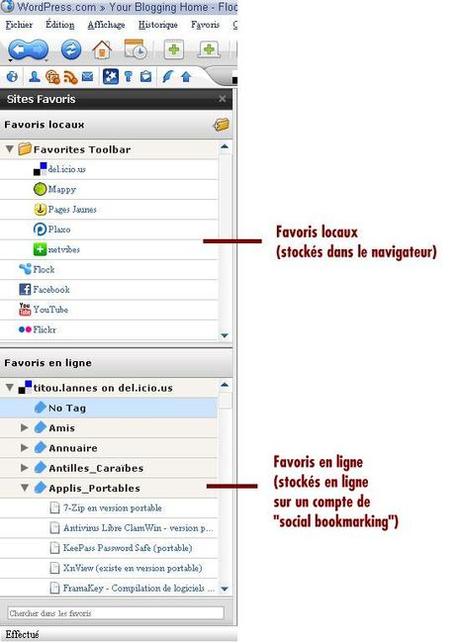
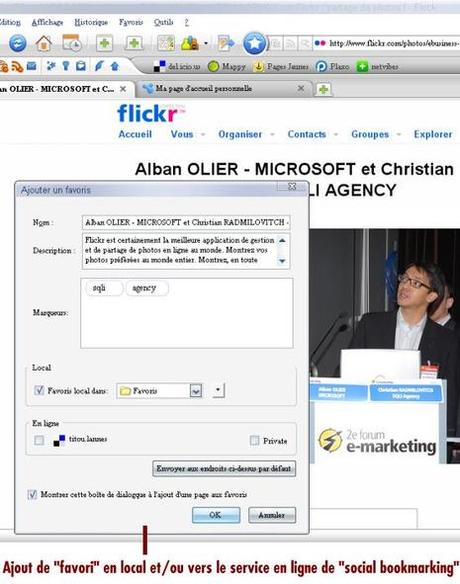
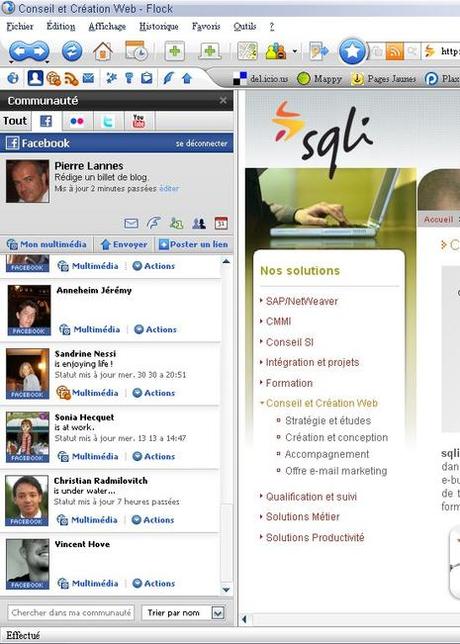
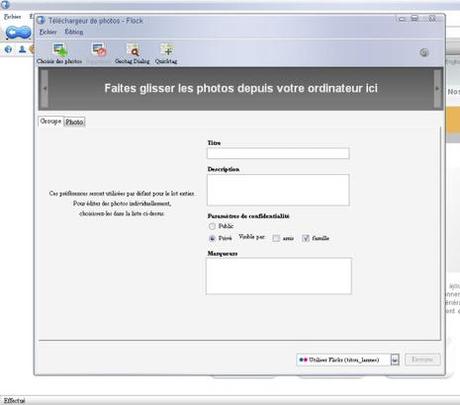
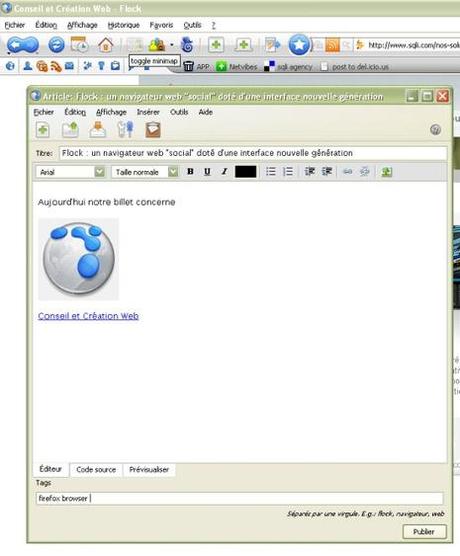
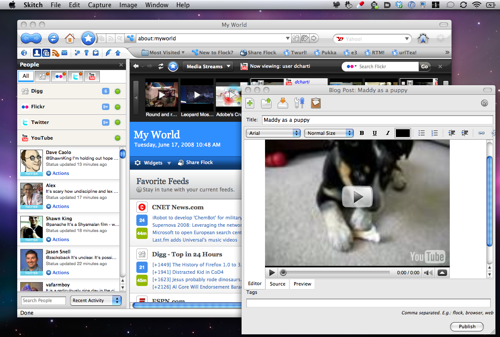
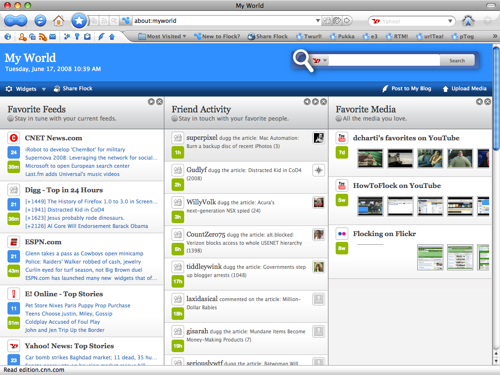
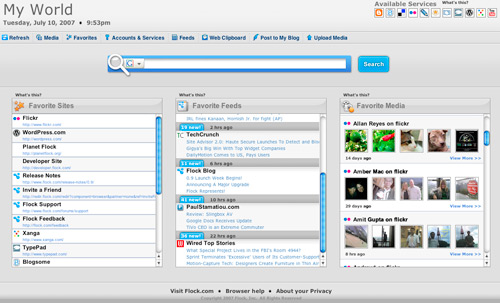
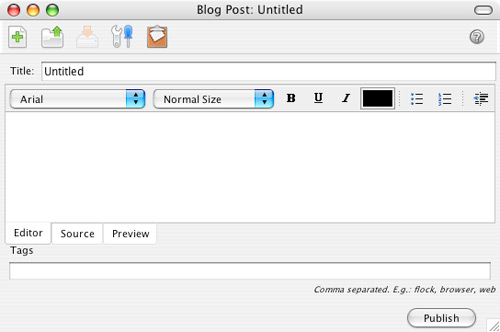
Integrated Blogging


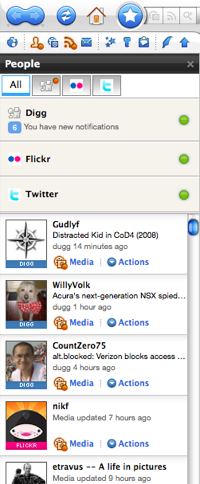
Del.icio.us Integration

Flickr Integration

-
-
paulstamatiou.com paulstamatiou.com
-
github.com github.com
Tags
Annotators
URL
-
-
eoxc.github.io eoxc.github.io
Tags
Annotators
URL
-
-
Tags
Annotators
URL
-
-
www.w3.org www.w3.org
-
github.com github.com
-
github.com github.com
-
worldwideweb.cern.ch worldwideweb.cern.ch
-
digital-archaeology.org digital-archaeology.org
- Jul 2022
-
chrome.google.com chrome.google.com
-
addons.mozilla.org addons.mozilla.org
-
scattered-thoughts.net scattered-thoughts.net
-
Here is how I produce invoices and contracts for consulting: Open an old invoice/contract in firefox. Use the inspector to change the values. Hit 'save as new file'.
-
-
notebook.wesleyac.com notebook.wesleyac.com
-
I recently started building a website that lives at wesleyac.com, and one of the things that made me procrastinate for years on putting it up was not being sure if I was ready to commit to it. I solved that conundrum with a page outlining my thoughts on its stability and permanence:
It's worth introspecting on why any given person might hesitate to feel that they can commit. This is almost always comes down to "maintainability"—websites are, like many computer-based endeavors, thought of as projects that have to be maintained. This is a failure of the native Web formats to appreciably make inroads as a viable alternative to traditional document formats like PDF and Word's .doc/.docx (or even the ODF black sheep). Many people involved with Web tech have difficulty themselves conceptualizing Web documents in these terms, which is unfortunate.
If you can be confident that you can, today, bang out something in LibreOffice, optionally export to PDF, and then dump the result at a stable URL, then you should feel similarly confident about HTML. Too many people have mental guardrails preventing them from grappling with the relevant tech in this way.
-
- Jun 2022
-
docs.google.com docs.google.com
-
https://docs.google.com/document/d/1N4LYLwa2lSq9BizDaJDimOsWY83UMFqqQc1iL2KEpfY/edit
P.R.O.B.E. rubric participation (exceeds, meets fails), respectful, open, brave, educational
Mentioned in the chat at Hypothes.is' SOCIAL LEARNING SUMMIT: Spotlight on Social Reading & Social Annotation
in the session on Bringing the Margins to Center: Introduction to Social Annotation
Looking at the idea of rubrication, I feel like I ought to build a Tampermonkey or Greasemonkey script that takes initial capitals on paragraphs and makes them large, red, or even illuminated. Or perhaps something that converts the CSS of Hypothes.is and makes it red instead of yellow?
What if we had a collection of illuminated initials and some code that would allow for replacing capitals at the start of paragraphs? Maybe a repository like giphy or some of the meme and photo collections for reuse?
-
-
github.com github.com
-
Chrome extension that adds to your browsing experience by showing you relevant discussions about your current web page from Hacker News and Reddit.
Similar to the browser extension / "bug" that shows other Hypothes.is conversations and annotations.
This would be cool if it could be expanded to personal search to show you blog conversations or Twitter conversations of people you follow.
Link to: - https://boffosocko.com/2022/06/18/wikilinks-and-hashtags-as-a-portal-to-cross-site-search/ - https://boffosocko.com/2019/06/29/social-reading-user-interface-for-discovery/
-
-
addons.mozilla.org addons.mozilla.org
-
www.ibiblio.org www.ibiblio.org
-
This page is excellent for an example of HTML being an adequate substitute for traditional office formats.
-
- May 2022
-
www.linkedin.com www.linkedin.com
-
Building and sharing an app should be as easy as creating and sharing a video.
This is where I think Glitch goes wrong. Why such a focus on apps (and esp. pushing the same practices and overcomplicated architecture as people on GitHub trying to emulate the trendiest devops shovelware)?
"Web" is a red herring here. Make the Web more accessible for app creation, sure, but what about making it more accessible (and therefore simpler) for sharing simple stuff (like documents comprising the written word), too? Glitch doesn't do well at this at all. It feels less like a place for the uninitiated and more like a place for the cool kids who are already slinging/pushing Modern Best Practices hang out—not unlike societal elites who feign to tether themself to the mast of helping the downtrodden but really use the whole charade as machine for converting attention into prestige and personal wealth. Their prices, for example, reflect that. Where's the "give us, like 20 bucks a year and we'll give you better alternative to emailing Microsoft Office documents around (that isn't Google Sheets)" plan?
-
-
addons.mozilla.org addons.mozilla.org
-
news.ycombinator.com news.ycombinator.com
-
However when you look UNDERNEATH these cloud services, you get a KERNEL and a SHELL. That is the "timeless API" I'm writing to.
It's not nearly as timeless as a person might have themselves believe, though. (That's the "predilection" for certain technologies and doing things in a certain way creeping in and exerting its influence over what should otherwise be clear and sober unbiased thought.)
There's basically one timeless API, and that means written procedures capable of being carried out by a human if/when everything else inevitably fails. The best format that we have for conveying the content comprising those procedures are the formats native to the Web browser—esp. HTML. Really. Nothing else even comes close. (NB: pixel-perfect reproduction à la PDF is out of scope, and PDF makes a bunch of tradeoffs to try to achieve that kind of fidelity which turns out to make it unsuitable/unacceptable in a way that HTML is not, if you're being honest with your criteria, which is something that most people who advocate for PDF's benefits are not—usually having deceived even themselves.)
Given that Web browsers also expose a programming environment, the next logical step involves making sure these procedures are written to exploit that environment as a means of automation—for doing the drudge work in the here and now (i.e., in the meantime, when things haven't yet fallen apart).
-
- Apr 2022
-
blog.whatwg.org blog.whatwg.org
-
Much of this sort of information was later reverse-engineered, and cross-browser support for basic operations is actually quite good. (Browsers still vary widely on the details.)
-
-
news.itsfoss.com news.itsfoss.com
-
Hence, to keep things balanced, I think we should constantly oppose the anti-competitive behavior by tech giants and start using Mozilla Firefox (in whatever capacity, even as a secondary browser).
This is an interesting argument as to what individual users can do to keep Firefox alive. But the biggest dent on anti-competitive behavior should come from well enforced proper anti-trust regulations the way Europe is doing it. How can browser users contribute to this?
Tags
Annotators
URL
-
- Mar 2022
-
addons.mozilla.org addons.mozilla.org
-
https://addons.mozilla.org/en-US/firefox/addon/epubreader/
A browser extension for reading ePub files in Firefox.
-
-
citeseerx.ist.psu.edu citeseerx.ist.psu.edudownload1
-
The complete overlapping of readers’ and authors’ roles are important evolution steps towards a fully writable web, as is the ability of deriving personal versions of other authors’ pages.
-
- Feb 2022
-
underpassapp.com underpassapp.com
-
underpassapp.com underpassapp.com
-
StopTheMadness is a web browser extension that stops web sites from making your browser harder to use
-
"The good news is that you can wrest control of your browser back from these malicious, control-freak sites."
-
unfortunately only iOS and Mac
see instead: - https://addons.mozilla.org/en-US/firefox/addon/enable-selection/?utm_source=addons.mozilla.org&utm_medium=referral&utm_content=search
-
-
every.to every.to
-
The third way I interact with my notes is a mechanism I’ve engineered whereby they are slowly presented to me randomly, and on a steady drip, every day.I’ve created a system so random notes appear every time I open a browser tabI like the idea of being presented and re-presented with my notations of things that were interesting to me at some point, but that in many cases I had forgotten about. The effect of surprise creates interesting and productive new connections in my brain.
Robin Sloan has built a system that will present him with random notes from his archive every time he opens a browser tab.
-
- Jan 2022
-
github.com github.com
-
Node is entirely at liberty to limit the design the same way we crash the process on errors (which browsers do not).
-
- Dec 2021
-
new-xkit-extension.tumblr.com new-xkit-extension.tumblr.com
-
https://new-xkit-extension.tumblr.com XKit for Tumblr functionality
Tags
Annotators
URL
-
- Nov 2021
-
askubuntu.com askubuntu.com
-
Perhaps not a good idea, in general, to use a random PPA for such sprawling software as a browser. Auditability near zero even if it is open source.
-
- Sep 2021
-
github.com github.com
-
This is not a published Chrome extension and it uses an odd workaround to circumvent Chrome security. So I'm not sure how safe it is. Keep an eye on it; if it develops enough, it could be quite useful.
-
-
github.com github.com
-
the bug is actually in webpack, related to fs in the web target.
-
-
blog.sindresorhus.com blog.sindresorhus.com
-
You can help make Node.js and browsers more unified. For example, Node.js has util.promisify, which is commonly used. I don’t understand why such an essential method is not also available in browsers. In turn, browsers have APIs that Node.js should have. For example, fetch, Web Streams (The Node.js stream module is awful), Web Crypto (I’ve heard rumors this one is coming), Websockets, etc.
-
The main reason I love Node.js is that I don’t have to deal with the awfulness that is JS front-end tooling.
-
- Aug 2021
-
pragmaticwebsecurity.com pragmaticwebsecurity.com
-
Hence, the refresh token allows an application to autonomously obtain a new access token from the security token service, without user intervention.
Although its true, that refreshing token without user interaction is a legal scenario, it is not for UI living in web browser, but rather for the server side apps, perhaps the BEFE.
-
- Jun 2021
-
web.dev web.dev
-
Unfortunately, many existing mechanisms to gauge and propagate trustworthiness—to work out if an interaction with a site is from a real human, for example—take advantage of techniques that can also be used for fingerprinting.
Tags
Annotators
URL
-
-
duckduckgo.com duckduckgo.com
Tags
Annotators
URL
-
-
github.com github.com
-
Runs headless by default, but you can configure it to run in a headful mode.
first sighting of term: headful
-
-
evilmartians.com evilmartians.com
-
In practice, we usually also need another tool to provide an API to control the browser (e.g., ChromeDriver).
-
“System tests” is a common naming for automated end-to-end tests in the Rails world. Before Rails adopted this name, we used such variations as feature tests, browser tests
-
-
hacks.mozilla.org hacks.mozilla.org
-
if you just need a screenshot of a webpage, that’s built in:
-
This poses a few problems for automation. In some environments, there may be no graphical display available, or it may be desirable to not have the browser appear at all when being controlled.
-
Browsers are at their core a user interface to the web, and a graphical user interface in particular.
-
-
browsersync.io browsersync.io
-
developer.mozilla.org developer.mozilla.org
-
The globalThis property provides a standard way of accessing the global this value (and hence the global object itself) across environments. Unlike similar properties such as window and self, it's guaranteed to work in window and non-window contexts. In this way, you can access the global object in a consistent manner without having to know which environment the code is being run in.
-
-
github.com github.com
-
Unlike browsers, you can access raw Set-Cookie headers manually using Headers.raw(). This is a node-fetch only API.
-
- May 2021
-
en.wikipedia.org en.wikipedia.org
-
The NoScript extension for Firefox mitigates CSRF threats by distinguishing trusted from untrusted sites, and removing authentication & payloads from POST requests sent by untrusted sites to trusted ones. The Application Boundary Enforcer module in NoScript also blocks requests sent from internet pages to local sites (e.g. localhost), preventing CSRF attacks on local services (such as uTorrent) or routers.
-
The Self Destructing Cookies extension for Firefox does not directly protect from CSRF, but can reduce the attack window, by deleting cookies as soon as they are no longer associated with an open tab.
-
-
www.dougengelbart.org www.dougengelbart.org
-
editor-browser tool sets
This hasn't happened yet, and is unlikely to happen anytime soon. We seem to be moving away from a read/write web, with authors only being able to edit content they've created on domains that they control. The closest I've seen to this is the Beaker Browser.
-
- Apr 2021
-
anagora.org anagora.org
-
flancian has some instructions for setting up Promnesia for various platforms.
-
-
github.com github.com
-
Firefox extension: https://addons.mozilla.org/en-US/firefox/addon/promnesia/
Promnesia is a browser extension for Chrome/Firefox (including Firefox for Android!) which serves as a web surfing copilot, enhancing your browsing history and web exploration experience.
TLDR: it lets you explore your browsing history in context: where you encountered it, in chat, on Twitter, on Reddit, or just in one of the text files on your computer. This is unlike most modern browsers, where you can only see when you visited the link.
I've been doing something a bit like this manually and it looks a lot like the sort of UI examples I've been collecting at https://boffosocko.com/2019/06/29/social-reading-user-interface-for-discovery/
-
- Mar 2021
-
github.blog github.blog
-
We’re happy to report that the good people at Google and Mozilla are moving towards adoption as well.
-
- Feb 2021
-
blog.webmemex.org blog.webmemex.org
-
This project is somewhat related to getmemex.com
Zegnat et al.: FYI WorldBrain's Memex (= getmemex.com) has some shared history with my WebMemex project; we collaborated for some months, then went in somewhat different directions; I focussed on web page snapshotting for a while, and got distracted with other things; WorldBrain's version added more and more features and got a lot closer to what I had in mind for WebMemex. — via treora # 21:34 on 2021-02-12
-
A browser extension for archiving web pages locally.
-
-
www.joinhoney.com www.joinhoney.comHoney1
Tags
Annotators
URL
-
-
darkreader.org darkreader.org
Tags
Annotators
URL
-
-
medium.com medium.com
-
I’d notice the network requests going out!Where would you notice them? My code won’t send anything when the DevTools are open (yes even if un-docked).I call this the Heisenberg Manoeuvre: by trying to observe the behaviour of my code, you change the behaviour of my code.
-
-
github.com github.com
-
stackoverflow.com stackoverflow.com
-
Your browser window is basically just one big iframe.
-
- Jan 2021
-
www.slackmoji.com www.slackmoji.com
Tags
Annotators
URL
-
-
support.box.com support.box.com
-
A setting in the browser might be preventing the use of javascript in select websites.
-
-
augmentedsteam.com augmentedsteam.com
-
www.npmjs.com www.npmjs.com
-
Think first: why do you want to use it in the browser? Remember, servers must never trust browsers. You can't sanitize HTML for saving on the server anywhere else but on the server.
-
-
violentmonkey.github.io violentmonkey.github.io
-
github.com github.com
- Dec 2020
-
sapper.svelte.dev sapper.svelte.dev
-
Note that preload will run both on the server side and on the client side. It may therefore not reference any APIs only present in the browser.
-
-
policies.google.com policies.google.com
-
Managing cookies in your browserMost browsers allow you to control how cookies get used as you’re browsing.Some browsers automatically limit or delete cookies. Also, in some browsers, you can set up rules to manage cookies on a site-by-site basis, allowing you to permit cookies only from sites that you trust.In Google Chrome, the Settings contain an option to Clear Browsing Data. You can use this option to delete cookies and other browsing data. See our instructions for managing cookies in Chrome.Google Chrome also supports private browsing with its Incognito mode. You can browse in Incognito mode when you don’t want your site visits or downloads to remain in your browsing and download histories. Once you close all your Incognito browsing windows, Chrome won’t save your browsing history, cookies, and other data.Losing the information stored in cookies may make sites less functional but shouldn’t prevent them from working.
-
-
www.geoffreylitt.com www.geoffreylitt.com
-
website developers and extension authors
Like, for example, Google having a problem with ad-blockers in Google Chrome. This is an example of why monopolies aren't great; Google makes money selling ads but they also control a browser that most people use. There's a conflict here when the users of the browser install extensions that limit Google's ability to show you ads.
-
-
developer.mozilla.org developer.mozilla.orgChrome1
-
In a browser, the chrome is any visible aspect of a browser aside from the webpages themselves (e.g., toolbars, menu bar, tabs). This is not to be confused with the Google Chrome browser.
-
- Nov 2020
-
stackoverflow.com stackoverflow.com
-
If you want a reference to the global object that works in any context, you can read this from a directly-called function. const global = (function() {return this})();. This evaluates to window in the browser, self in a service worker and global in nodejs.
-
emphasizing that 'this' and 'global object' are two different things not only in Node.js but in JavaScript in general
-
-
github.com github.com
-
Microbundle also outputs a modern bundle specially designed to work in all modern browsers. This bundle preserves most modern JS features when compiling your code, but ensures the result runs in 90% of web browsers without needing to be transpiled. Specifically, it uses preset-modules to target the set of browsers that support <script type="module"> - that allows syntax like async/await, tagged templates, arrow functions, destructured and rest parameters, etc. The result is generally smaller and faster to execute than the esm bundle
-
-
matthiasott.com matthiasott.com
-
The Web needs to be accessible to everyone who wants to participate, who wants to share their knowledge with the world, who is not satisfied with the status quo and ready to change culture and society. Yet instead, we are currently building a Web of superficial distractions that is becoming less and less accessible to future generations.
i am dead cold afraid that the web that is coming seems like it will not support extensions. the bookmarklet is dead, extensions are only on desktop. websec has won, sites are secure, and alas, secured against the almighty user who we all agreed we served.
what sites do- now that's also been, frankly, not great.
-
- Oct 2020
-
www.basefactor.com www.basefactor.com
-
Ubiquity: you can also run your validation on the server side (e.g. nodejs)
-
-
-
Using the keyboard arrows, navigate down the suggestion list to the item(s) you want to remove from the Chrome autofill suggestions With the suggestion highlighted, use the appropriate keystroke sequence to delete the Chrome suggestion:
Linux: Shift + Delete
-
-
github.com github.com
-
Use a node-style require() to organize your browser code and load modules installed by npm.
-
-
github.com github.com
-
browserify is a tool for compiling node-flavored commonjs modules for the browser.
-
-
-
Think of JavaScript. In the browser you don't have direct access to the file system. In Node.js you have. Same programming language. Different APIs.
-
-
github.com github.com
-
import page from "//unpkg.com/page/page.mjs";
-
Or with modules, in modern browsers
-
-
stackoverflow.com stackoverflow.com
-
Node.js code must be run by the node process, not the browser (the code must run in the server).
-
- Sep 2020
-
medium.com medium.com
-
Modules using code that doesn’t exist in browsers such as process.env.NODE_ENV and forcing you to convert or polyfill it.
-
-
rollupjs.org rollupjs.orgRollup1
-
Some modules, like events or util, are built in to Node.js. If you want to include those (for example, so that your bundle runs in the browser), you may need to include rollup-plugin-node-polyfills.
-
-
mdn-web-dna.s3-us-west-2.amazonaws.com mdn-web-dna.s3-us-west-2.amazonaws.com
-
react-spectrum.adobe.com react-spectrum.adobe.com
-
There are very few built-in UI controls in the browser, and those that do exist are very hard to style.
-
-
exploringjs.com exploringjs.com
-
Ways of delivering JavaScript source code
-
-
kwokchain.com kwokchain.com
-
Figma is browser-first, which was made possible (and more importantly performant) by their understanding and usage of new technologies like WebGL, Operational Transforms, and CRDTs. From a user’s perspective, there are no files and no syncing that needs to be done with others editing a design. The actual *experience* of designing in Figma is native to the internet. Even today, competitors often talk about cloud, but are torn over how *much* of the experience to port over to the internet. Hint: “all of it” is the correct answer that they all eventually will converge on.
Company's struggle to figure out how much of their experience they should port over to the cloud. Figma pioneered the idea of porting all of it and call it a "browser first" application.
For the Figma user there are no versioned files and there is no syncing.
Kwok claims all companies will converge to having all of their experience be "internet native".
-
- Jul 2020
-
www.w3.org www.w3.org
-
As a result, web browsers can provide only minimal assistance to humans in parsing and processing web pages: browsers only see presentation information.
-
- Jun 2020
-
forums.phpfreaks.com forums.phpfreaks.com
-
How do I change my cookie settings? Most web browsers allow some control of most cookies through the browser settings. To find out more about cookies, including how to see what cookies have been set and how to manage and delete them, visit www.aboutcookies.org or www.allaboutcookies.org.
-
- May 2020
-
stackoverflow.com stackoverflow.com
-
1. Disabling concrete extension update. That's what I wanted! You can do this by editing the extensions manifest json-file on Windows: C:\Users\<USERNAME>\AppData\Local\Google\Chrome\User Data\Default\Extensions\<EXTENSION-ID>\<VERSION>\manifest.json (find out the extensions ID by enabling developer mode in the extension settings page) on Ubuntu for Chromium: ${HOME}/.config/chromium/Default/Preferences In this file set "update_url" property to something invalid like "https://localhost" for example. For now according to given url updating of that extension is simply impossible.
-
-
-
Most web browsers are set by default to protect your privacy unless you opt for tracking yourself. For example, Internet Explorer automatically enables its “Do Not Track” option and Google Chrome blocks any 3rd-party cookies by default.
-
-
www.addictivetips.com www.addictivetips.com
-
The context menu will have three options; Normal Reload, Hard Reload, and Empty Cache and Hard Reload. The third option is what you’re looking for. Click ‘Empty Cache and Hard Reload’ to clear the cache for a particular website.
-
-
superuser.com superuser.com
-
After opening up the developer tools (usually by pressing F12) Click + Hold on the "Reload Page" button. From the popup list, choose "Empty Cache and Hard Reload".
-
-
complianz.io complianz.io
-
The mix of a fingerprint and first-party cookies is pervasive as Google can give a very high level of entropy when it comes to distinguishing an individual person.
-
-
developer.mozilla.org developer.mozilla.orgGecko1
-
Products using the same version of Gecko have identical support for Web standards.
-
-
github.com github.com
-
github.com github.com
-
extensionworkshop.com extensionworkshop.com
-
Add-ons that are intended for internal or private use, are only accessible to a closed user group, or for distribution testing may not be listed on AMO. Such add-ons may be uploaded for self-distribution instead.
-
-
extensionworkshop.com extensionworkshop.com
-
extensionworkshop.com extensionworkshop.com
-
Firefox is at the forefront of cross-browser compatibility.
-
cross-browser development
-
-
-
github.com github.com
-
I would love for Mozilla to make this extension irrelevant by providing the functionality natively. Language translation is a standard and yet highly differentiating feature in Chrome and Edge.
-
-
pixelprivacy.com pixelprivacy.com
-
Browser fingerprinting is a powerful method that websites use to collect information about your browser type and version, as well as your operating system, active plugins, timezone, language, screen resolution and various other active settings.
These data points might seem generic at first and don’t necessarily look tailored to identify one specific person. However, there’s a significantly small chance for another user to have 100% matching browser information. Panopticlick found that only 1 in 286,777 other browsers will share the same fingerprint as another user.
-
Browser fingerprinting is defined on Wikipedia as follows: “A device fingerprint, machine fingerprint or browser fingerprint is information collected about a remote computing device for the purpose of identification. Fingerprints can be used to fully or partially identify individual users or devices even when cookies are turned off.”
That means that, when you connect to the internet on your laptop or smartphone, your device will hand over a bunch of specific data to the receiving server about the websites you visit.
-
- Apr 2020
-
stackoverflow.com stackoverflow.com
-
So in the case of Chrome, the developers have essentially said "we will leave this to the user to decide in their preferences whether they want autocomplete to work or not. If you don't want it, don't enable it in your browser". However, it appears that this is a little over-zealous on their part for my liking, but it is the way it is.
-
-
-
If you are signed in to Chrome with the a Google account and try to sign it to that Google account on a web page, Chrome will not offer to save that password.
You have to "disconnect" your Google Account from Chrome, which to me is an unfortunate workarounds.
They should just give the option to people who want to both have the accounts connected and save that password.
Tags
Annotators
URL
-
-
panopticlick.eff.org panopticlick.eff.org
-
Browser fingerprinting is quite a powerful method of tracking users around the Internet. There are some defensive measures that can be taken with existing browsers, but none of them are ideal. In practice, the most realistic protection is using the Tor Browser, which has put a lot of effort into reducing browser fingerprintability. For day-to-day use, the best options are to run tools like Privacy Badger or Disconnect that will block some (but unfortunately not all) of the domains that try to perform fingerprinting, and/or to use a tool like NoScript for Firefox, which greatly reduces the amount of data available to fingerprinters.
-
Browser fingerprinting is both difficult to detect and and extremely difficult to thwart.
-
“Browser fingerprinting” is a method of tracking web browsers by the configuration and settings information they make visible to websites, rather than traditional tracking methods such as IP addresses and unique cookies.
-
When you visit a website, you are allowing that site to access a lot of information about your computer's configuration. Combined, this information can create a kind of fingerprint — a signature that could be used to identify you and your computer. Some companies use this technology to try to identify individual computers.
-
-
-
since mobile Chrome still doesn't support extensions (Google plz)
-
-
keepass.info keepass.info
-
The user's computer stores and transmits cookies. Therefore, you as a user also have full control over the use of cookies. You can deactivate or restrict the transmission of cookies by changing the settings in your browser. Cookies that have already been saved can be erased at any time. This can also be done automatically. Please consult the documentation of your browser. Links to the cookie management documentations of some popular browsers:
-
-
developer.chrome.com developer.chrome.com
-
stackoverflow.com stackoverflow.com
-
I usually write example code that is for both Chrome and Firefox WebExtensions.
-
-